OKR software for individuals and freelancers
One objective per quarter, key results with numbers, weekly goals and a daily focus. Nothing stands alone.

OKR software for one person needs four things: an objective for the quarter, key results as measurable milestones, a weekly check-in, and daily tasks you check off. It does not need roles, departments, or an onboarding call. Gaapp does exactly that with a goal chain from year to day.
Who this OKR software is for
The OKR tools in the search results are built for companies. This OKR software is built for two groups who plan a quarter without a team.
Individuals
Personal OKR for work or life, one quarter, one clear focus. The yearly goal sets the direction, the quarter carries the objective, the week holds the next steps. The free plan gives you one yearly goal and every level below it, at no cost.
Freelancers and solo founders
One objective per quarter that moves revenue or visibility. Key results as numbers in the goal title: inquiries, project examples, subscribers. Weekly goals keep client work and your own growth visible, no meeting, no reporting.
OKR for individuals means no roles, no alignment across departments, no cascading charts. It is an OKR planner for one person, not an enterprise suite. As a personal OKR app it works on phone, tablet, and desktop, nothing to download. Your personal space belongs to you alone; if you do not work alone, plan for yourself or together. Setting goals you actually reach: how to achieve goals.
OKR software for one person: how OKR maps onto the goal chain
OKR has four building blocks: objective, key results, initiatives, check-in. The goal chain has five levels: year, quarter, month, week, day. There is no goal type called key result; your OKR goes straight onto the chain.
Objective at quarter level
Your objective is your quarterly goal, period Q4 2026. It sits under your yearly goal; in Free and Pro a quarterly goal needs a yearly goal above it. The yearly goal is the direction, the objective the one thing for these three months. How to find your yearly goal: [annual planning](/en/annual-planning).
Key results with start and target values
Key results are monthly goals under the objective. Start and target go in the title with an arrow: Inquiries 2 → 6. At the check-in you add the current value in between, 2 → 4 → 6, and check it off once the target is reached. No number field per goal; as OKR tracking software it counts the share of goals completed per period.
Weekly check-in
Weekly goals run by ISO week, shown as Week 41. This is your OKR tracker: each week shows how much is done and how much of the week has passed; the thin line marks elapsed time. You notice on Wednesday, not Sunday, that the week is slipping.
Daily tasks
The daily focus shows the few things that matter today. Check off and move on. Progress rolls up automatically. Examples under [daily goals](/en/daily-goals).
One chain
Every daily goal belongs to a week, every week to a month, quarter, and year. Nothing stands alone.
Your OKR quarter in four steps:
Set
Add a yearly goal, the quarterly objective under it, and two or three key results as monthly goals with start and target in the title.
Check in weekly
One to three weekly goals that move a key result. At the check-in, update each key result's value.
Check off daily
The daily focus shows what is on for today. Check it off; progress rolls up automatically.
Grade
At quarter end you score each key result yourself from 0 to 1.0; 0.6 to 0.7 counts as success for ambitious OKRs (Doerr 2018). In Pro, the history of past periods stays visible; note the score in the goal title.
An OKR example inside the goal chain
The objective and its three key results come from the diagram in the OKR framework article: a freelancer wants to win clients through her website instead of ads in Q4 2026. The yearly goal, the week, and the day are added here. This is her personal OKR on the chain.
| Level | Goal in Gaapp | Role in OKR |
|---|---|---|
| Year 2026 | Clients come through my website, not through ads | Direction |
| Quarter Q4 2026 | New clients find me through my website, not through ads | Objective |
| Month | Website inquiries: 2 → 6 per month | Key result 1 |
| Month | Published project examples: 3 → 10 | Key result 2 |
| Month | Newsletter subscribers: 180 → 500 | Key result 3 |
| Week 41 | Publish one project example. Rewrite two blog posts. | Initiatives |
| Day | Write the project example for client Miller, 45 minutes | Action |
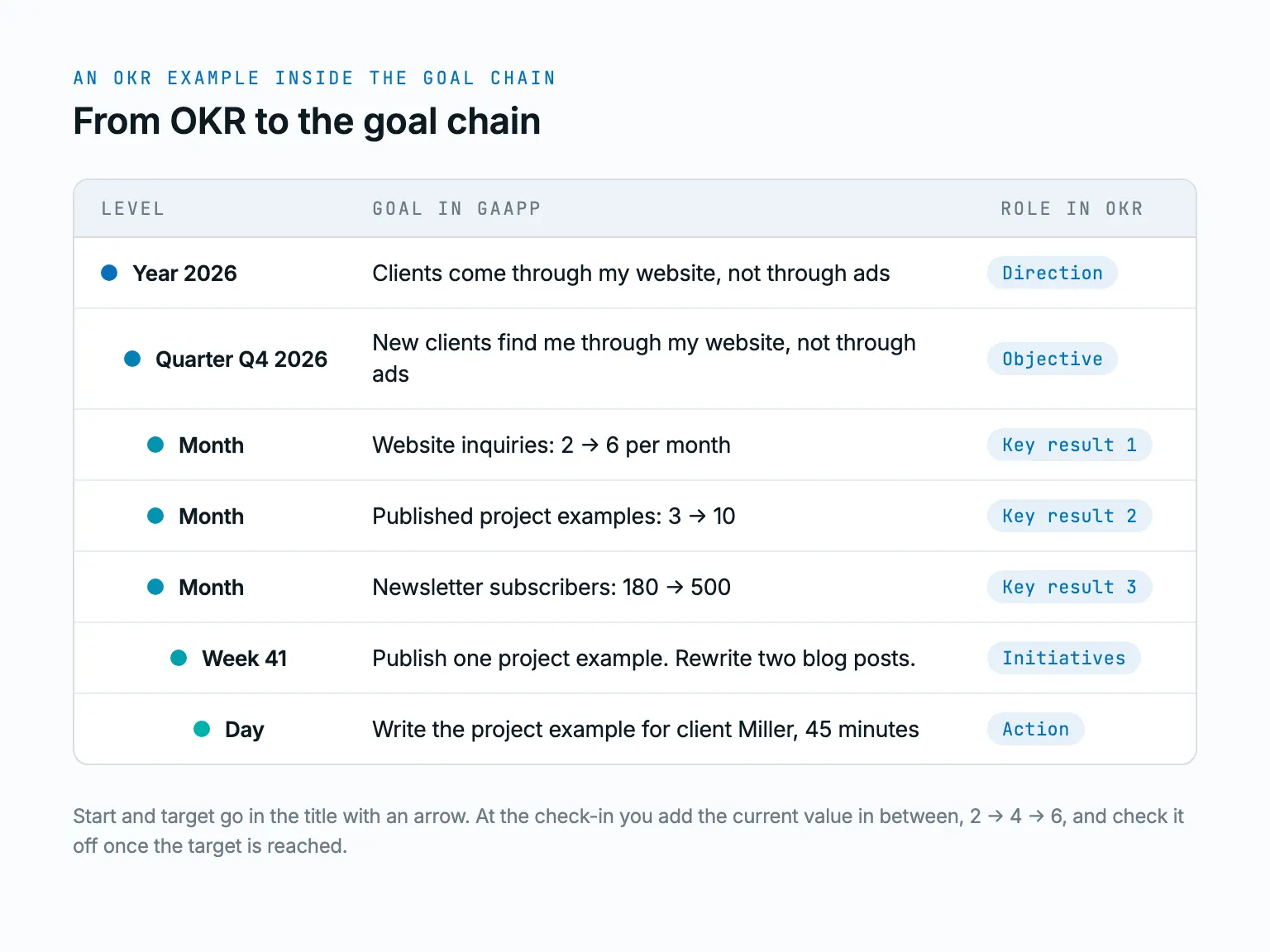
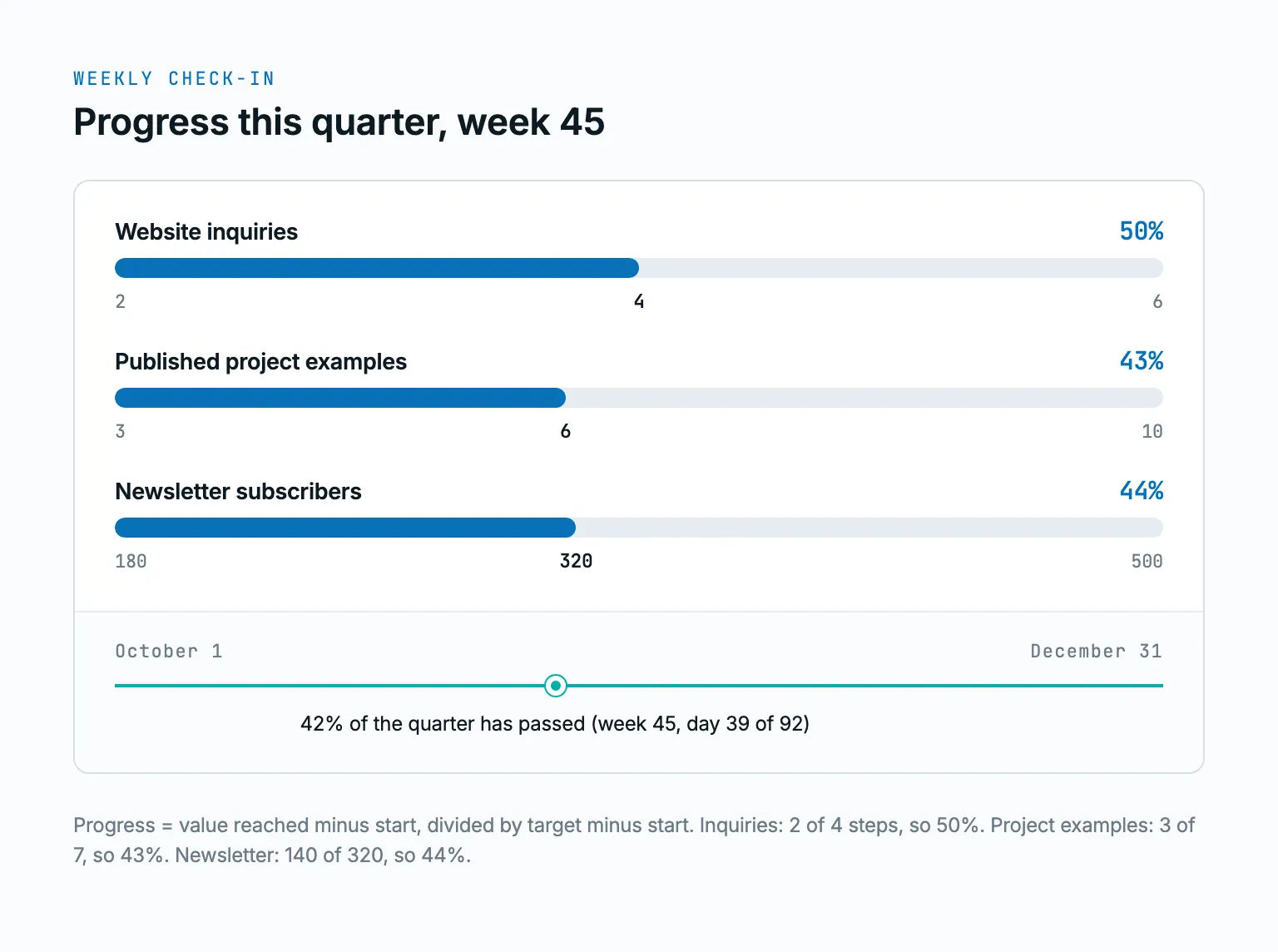
You add the three key results as monthly goals in the last month of the quarter, one goal each; for a monthly checkpoint, add them in October and November with an interim value. The math is yours: value reached minus start, divided by target minus start. At 4 inquiries in week 45, that is 2 of 4 steps, so 50 percent.
The same structure, year to day, is the OKR template, filled with a different example. Copy it, swap in your numbers, go.
Gaapp, a spreadsheet, Notion, or enterprise OKR software?
An OKR tool for one person must do three things: set up the chain in minutes, work as a weekly tracker without tinkering, and cost nothing before it pays off. How the four options compare:
| Criterion | Gaapp | Spreadsheet (Excel, Google Sheets) | Notion | Enterprise OKR platform |
|---|---|---|---|---|
| Setup | Add a yearly goal, quarter to day below it | Build columns, formulas, and periods yourself | Find a template, link databases, build views | Roles, teams, cross-department alignment |
| One person | Built for it: personal space, one yearly goal free | Yes, maintained by hand | Yes, structure built by you | Built for teams, usually priced per seat |
| Weekly check-in | Weekly goals per ISO week, progress and time line | Only with your own weekly columns | Only with your own database view | Usually included |
| Number per key result | No; start and target in the title, you do the math | Yes, any formula | Yes, with number and formula fields | Usually yes, a number field per key result |
| Price | Free €0, Pro €15 per month or €144 per year | Part of most office suites; Google Sheets is free | Free plan, paid plans per user | Per user per month or on request |
The spreadsheet wins for three numbers you never forget to open. Notion wins if you enjoy building systems. The enterprise tool wins once you have three departments to align. In between sits the goal chain: ready to use, weekly check-in, daily focus, one person. Prefer twelve weeks with a final sprint? See the 12 week year.
What this OKR software costs
The free plan is enough to start. All prices in euro, including applicable taxes.
- Free, €0. One yearly goal with quarterly, monthly, weekly, and daily goals below it, progress across all levels.
- Pro, €15 per month or €144 per year (€12 per month, a 20 percent saving). Three yearly goals at once, history of past periods. 14-day free trial, no payment to start.
You can compare all plans on the pricing page.
OKR software questions
What is the best OKR software?
It depends on how many people have to agree on the goals. For a company with several departments, the best OKR software is a system with roles, alignment views, and reporting, and that is what lists of the top 10 OKR tools compare. If you are one person, most of that list does not apply. Then the best tool is the one you open every week: a spreadsheet, or a goal chain with a weekly check-in and a daily focus.
What is an OKR vs a KPI?
A KPI measures an ongoing state, such as revenue per month or visitors per week, and has no end date. An OKR describes a change with a deadline: from 2 to 6 inquiries by the end of the quarter. A KPI becomes a key result the moment it is supposed to move within a quarter. After that, it is a KPI again, a number you keep an eye on. More in the OKR framework explained.
Does Google still use OKR?
What is certain: John Doerr introduced OKR at Google in 1999, and Google documented the practice in its re:Work guide, including the scoring from 0 to 1.0. Whether every part of Google runs company-wide OKR today is not something we can verify. The method does not depend on it. It works the same way for a large company and for one person planning a quarter. How the cycle and the scoring work: the OKR framework explained.
What is the best free OKR software?
For one person there are two options. A spreadsheet is free and fine if you track only three numbers and open it every week. The free plan of Gaapp costs €0 and includes one yearly goal with quarterly, monthly, weekly, and daily goals below it, progress across all levels included. There is nothing to download. That gives you one objective with key results, weekly goals, and a daily focus. If you want three yearly goals at once or the history of past quarters, Pro has a 14-day free trial.
Are OKRs still relevant?
Yes, for anyone who needs a quarter with one focus and results they can measure. The criticism is real for companies that turn OKR into a reporting ritual with dozens of numbers and a bonus attached. For one person, none of that applies; the quarter stays small enough to keep in view. The full method with its criticism and a template is in the OKR framework explained.
Can I use OKR software like Gaapp.io as one person?
Yes, and for one person the method is simpler than for a company because alignment and roles fall away. An OKR tool for individuals needs one objective, two to three key results with numbers, weekly goals, and a daily focus, nothing more. How to write key results with clean numbers is shown in the SMART goals examples. What matters is the weekly look at the numbers, not the software.
Read next
- Leadership & Teams
OKR Framework: Examples, Template and Criticism
The OKR framework explained: OKR meaning, objectives and key results, the cycle, scoring, seven examples for work and life, criticism, and a template.
- Templates
OKR Template for One Quarter: Objective, Key Results, Weekly Check-in
One objective, three key results with starting and target values, initiatives per week, a weekly check-in, and a 0 to 1.0 score at the end of the quarter. Filled in with an example, blank to copy. Free.
- Methods
Annual Planning: A Guide for One Person, With Template and Examples
Three to five yearly goals, broken down to the week. For one person, not a corporation.
- Methods
How to Achieve Goals: Methods, Examples and a System From Year to Day
How to choose a method, write a goal with real numbers and track it from the year down to today. With five examples, two complete goal chains and a weekly check-in that takes 15 minutes.