Eisenhower Matrix Template: Free Printable PDF
Four quadrants, a line for your weekly goal, columns for when, who, and hours. Page 1 is a blank Eisenhower Matrix printable, page 2 a filled-in example. Free, US Letter landscape.

This Eisenhower Matrix template is not a blank two by two grid. It asks for your weekly goal first, because that is the only way to tell what is important. You get a free Eisenhower Matrix PDF with two pages: page 1 is the blank Eisenhower Matrix printable, page 2 shows it filled in with Dana’s week. For the method itself, read Eisenhower Matrix: How to Sort Urgent From Important. This page is about the sheet.
Download the Eisenhower Matrix template as a PDF
Download the PDF: two pages, US Letter landscape, free. Print page 1 as often as you need, one sheet per day or one per week.
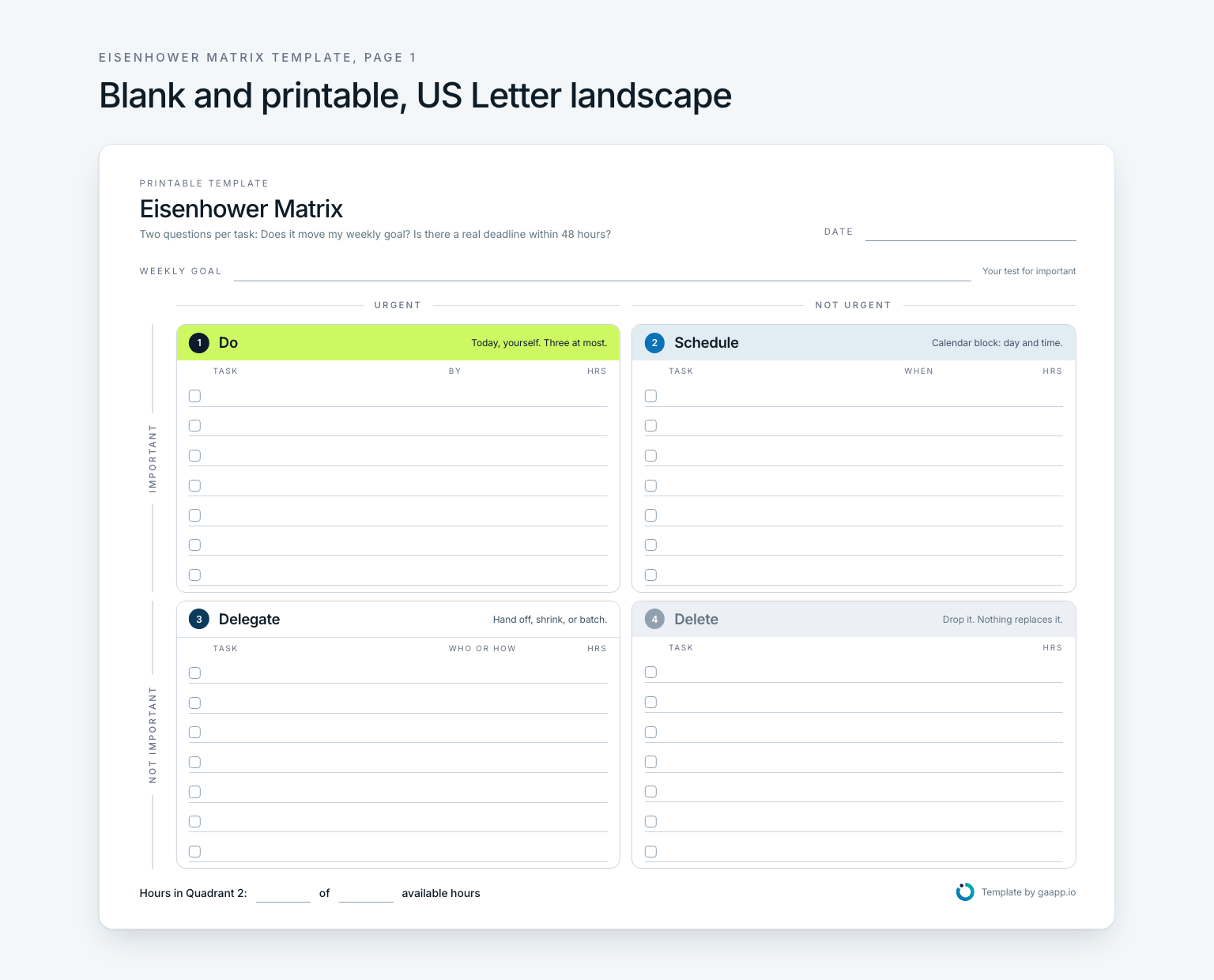
What’s in the Eisenhower Matrix template
- Date and weekly goal. One line at the top that every task is measured against. Without it, everything feels important.
- Axes. Urgent and not urgent across the top, important and not important down the side. Every combination lands in exactly one quadrant.
- Quadrant 1, Do. Urgent and important. The By column takes a time. More than three entries is a warning sign.
- Quadrant 2, Schedule. Important, not urgent. The When column asks for a day and a time, because scheduling means a calendar block.
- Quadrant 3, Delegate. Urgent, not important. The Who or how column records whether you hand it off, shrink it, or batch it.
- Quadrant 4, Delete. Neither. Cross it out. Nothing replaces it.
- Hours. Every row has a column for your estimate. The bottom line holds the one number that matters: hours in Quadrant 2 out of the hours you had.
Each quadrant has seven lines with a checkbox each. If you need more than seven lines in one quadrant, you are no longer sorting. You are collecting.
How to fill out the Eisenhower Matrix worksheet in five steps
Write your weekly goal
One line, taken from your monthly goal, such as “contract redlines back to the vendor.” If you are not sure how to phrase it, see [weekly goals](/en/blog/weekly-goals).
Dump everything, then sort
List every task on scrap paper first. Then ask the two questions at the top of the sheet for each task and write it into its quadrant.
Estimate hours
Put a rough estimate on every row. If the total is bigger than the time you have, you know before the first meeting what will not happen.
Fill in the right column
Quadrant 1 gets a time, Quadrant 2 a calendar slot, Quadrant 3 a name or a method such as “two 30-minute batches.” Quadrant 4 gets crossed out.
Count Quadrant 2 at the end
How many hours went to Quadrant 2? Write the number at the bottom. After a few weeks you can see whether your goals are getting time or only your inbox is.
Filled-in example: Dana’s week
Dana runs operations for a 45-person online furniture retailer in Columbus, Ohio, and is rolling out new warehouse software on top of her regular job. Her weekly goal for the week of October 5: contract redlines back to the vendor and migration plan v1 sent to IT. Her Monday list had 23 items and 24.5 hours of estimated work, with 22 hours open.
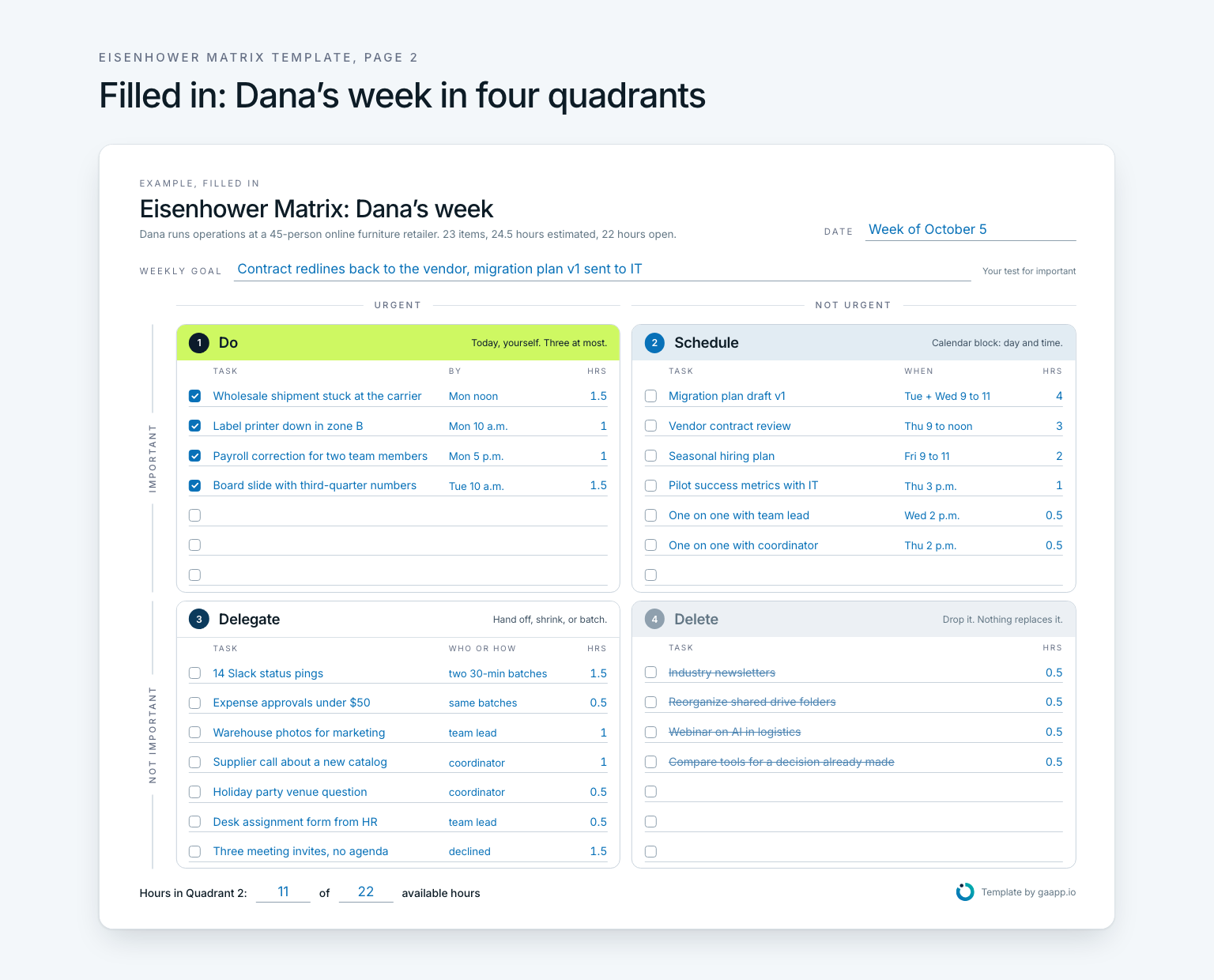
Quadrant 1 holds four fires worth five hours. Quadrant 2 holds six items and 11 hours, each with a slot, the migration plan first. Quadrant 3 is the longest list, and none of it stays on Dana’s desk. Her team lead and her coordinator take four items, the Slack pings and approvals go into two 30-minute batches, and three meetings without an agenda get declined. Quadrant 4 is crossed out. The bottom line reads 11 of 22 hours in Quadrant 2.
Eisenhower Matrix template for Excel, Word, or Google Sheets
The PDF is built for printing, not typing. If you would rather sort on screen, copy the text block below into Excel, Word, Google Sheets, or a notes app. In a spreadsheet, each task becomes a row with columns for quadrant, when, and hours. Sort by the quadrant column and the four groups line up on their own, with no grid to draw. The same layout works as an Eisenhower Box template, since the box is the same grid under another name.
EISENHOWER MATRIX                                      Date: ____________
Weekly goal (your test for important): _________________________________

QUADRANT 1  DO          urgent and important         By          Hrs
[ ] ........................................         ______      ____
[ ] ........................................         ______      ____
[ ] ........................................         ______      ____

QUADRANT 2  SCHEDULE    important, not urgent        When        Hrs
[ ] ........................................         ______      ____
[ ] ........................................         ______      ____
[ ] ........................................         ______      ____

QUADRANT 3  DELEGATE    urgent, not important        Who/how     Hrs
[ ] ........................................         ______      ____
[ ] ........................................         ______      ____
[ ] ........................................         ______      ____

QUADRANT 4  DELETE      neither                                  Hrs
[ ] ........................................                     ____
[ ] ........................................                     ____

Hours in Quadrant 2: ____ of ____ available hours
When paper is enough and when an app helps
Paper is enough as long as your weekly goal is clear and you start each day with a fresh sheet. The matrix then sorts one day in ten minutes, with no tool at all. That is its strength, and it is what this template is for.
Paper runs out when the importance test depends on more than one line. Your weekly goal comes from a monthly goal, the month from a quarter, the quarter from a yearly goal. Gaapp keeps that chain: every daily goal belongs to a week, every week to a month, quarter, and year, and progress rolls up as you check goals off. Gaapp has no Eisenhower view, no fields for urgent or important, and no hour estimates. In short: the template sorts your tasks, the app tells you what to measure them against. The most important item in Quadrant 2 becomes one of your daily goals there. How the chain from year to day is built is covered in how to achieve goals.
Frequently asked questions about the Eisenhower Matrix template
Is there a free printable Eisenhower Matrix template?
Yes. The PDF on this page is free and has two pages in US Letter landscape: a blank Eisenhower Matrix printable and a filled-in example. Print page 1 as often as you like, one sheet per day or per week.
Is there an Eisenhower Matrix template in Excel or Word?
Not as a separate file. Paste the text block above into Excel, Word, or Google Sheets. In Excel, give each task a row with columns for task, quadrant, when, and hours, then sort by quadrant. For paper, the PDF is the better choice, because the quadrants and lines are already set.
What is an Eisenhower Box template?
The same grid under a different name. Eisenhower Box is the term the writer James Clear used in a 2014 essay, and many templates carry it. This template works for both names: two questions, four boxes, one decision per task.
Should I use one sheet per day or per week?
Either works. For a single day, seven lines per quadrant are almost always enough. If you sort a whole week, as Dana does, use one sheet for everything due by Friday and give Quadrant 2 items slots on different days. The weekly goal at the top stays the same.
What goes in the Delete quadrant?
Everything that neither moves your weekly goal nor has a real deadline. Write it down and cross it out, so it leaves your head. Nothing replaces it. If an item keeps coming back every week, it may belong to a goal you have not written down yet.
How many tasks belong in Quadrant 1?
Few. If more than three items land there on a normal day, most of them are Quadrant 2 work that never got a slot. A bigger Quadrant 1 does not fix that. A fixed calendar block in Quadrant 2 does.