One-on-One Meeting Template: Agenda, Notes, Goals
A one-on-one meeting template in four parts: a header you fill in once, a 30-minute agenda, notes with action items, and a monthly growth check.

Contents
- 01What a one on one meeting template is, and what it is not
- 02How to structure a 1 on 1 meeting: the template at a glance
- 03Part 1: the header you fill in once
- 04Part 2: the weekly 1:1 meeting template for 30 minutes
- 05Part 3: notes and action items, or how to write a 1 to 1 meeting
- 06Part 4: the monthly growth one on one template
- 07The 40/20/40 rule: set up the template in six steps
- 08The three mistakes that turn a template into a form
- 09From the quarterly goal to Tuesday: the template in the goal chain
- 10Questions about one on one meeting templates
A one-on-one meeting template is not a form you fill in for HR. It is one shared document per direct report with four parts you reuse every week: a header you fill in once, a 30-minute agenda, a section for notes and action items, and a monthly check on growth and goals. A form records what happened. A good template decides what happens next.
Each part is below as a table you can copy into Google Docs, Notion, or Confluence, filled in with a real week so you can see how short a useful entry is. The example is Maya, an engineering manager with five direct reports, and her weekly 1:1 with Sam, a backend engineer who has been on her team for two years. If you want the bigger picture first, why 1:1s matter, how often to hold them, and which questions to ask, read the guide to the one-on-one meeting. This article is about the document you bring to it.
What a one on one meeting template is, and what it is not
Most templates online are status templates. They list projects, percent complete, and blockers, and they look tidy. That is not a bad thing. A status template is built for a standup or a project review, and it answers the question of what the team is doing. A 1:1 asks something else: how is this person doing, and what do they need from you? Who fills in a status template in their own 1:1 and feels heard?
Andy Grove made the point in High Output Management, published in 1983: the one-on-one is the report's meeting, and the report sets the agenda and ideally brings an outline. A template turns that advice into a habit. Whoever has a place to write topics down before Tuesday will bring the real ones. Whoever has to come up with them in the first minute will bring the safe ones. That means: the template is less about format and more about who gets to fill it in first.
Running doc or meeting notes
A running doc is one document per report, with the newest meeting on top, that you never replace. Meeting notes are a new file each week. Choose the running doc. Action items from three weeks ago stay one scroll away, which is the only way anyone actually checks them.
How to structure a 1 on 1 meeting: the template at a glance
A 1 on 1 meeting has a simple order: the report first, the manager second, actions last. The template mirrors that order and adds two parts that do not change every week. Here is what each part is for.
| Part | When you use it | Who fills it in | Time | Output |
|---|---|---|---|---|
| 1. Header | once, reviewed every quarter | both, in the first 1:1 | 20 minutes, one time | Goals, career goal, and working agreements in one place |
| 2. Weekly agenda | every 1:1 | report first, manager second | 30 minutes | The topics that matter this week, in the report's order |
| 3. Notes and action items | during and right after the 1:1 | manager writes, report reads back | 3 minutes plus 5 after | Who does what by when |
| 4. Monthly growth check | every fourth 1:1 | report answers, manager asks | replaces the topic list once a month | One stretch task and one change in how you work together |
The weekly agenda is the only part you see every time. The other three keep it honest. The header reminds both of you what the quarter is for. The action items prove that last week's conversation changed something. The monthly check stops the 1:1 from turning into a weekly to-do review. In short: three parts hold the context, one part holds the conversation.
Part 1: the header you fill in once
The header sits at the top of the running doc and rarely changes. You fill it in together in your first 1:1 with a new report, or in the next one if you are switching to a template now. Maya and Sam took 20 minutes for it.
| Field | What goes in | Example: Sam |
|---|---|---|
| Who and when | Names, day, time, length | Maya and Sam, Tuesdays 10:00, 30 minutes |
| Role | Role, level, time on the team | Backend engineer, mid level, two years on the billing team |
| Team goal this year | The one goal the team is measured on | Retire the old billing system by December 31 |
| Goal this quarter | The report's own quarterly goal, with a number | All 14 nightly batch jobs on the new scheduler by December 15, zero missed runs |
| Career goal | Where the report wants to be in a year | Lead technical decisions, aiming for senior engineer within 12 months |
| Feedback style | How the report likes to get feedback | Written first, then a short talk. Direct is fine |
| Manager's commitment | What the manager does to support the goals | No on-call swaps for Sam during the migration |
| Working agreements | Rules both of you follow | Never cancel, only move. Topics in the doc by Monday 6 pm |
Two fields matter more than the rest. The quarterly goal with a number gives the weekly goal check something to measure. The manager's commitment makes the header a two-way agreement. Anyone who writes down only what the report owes is writing an expectation, not an agreement.
Part 2: the weekly 1:1 meeting template for 30 minutes
This is the part most people mean when they search for a 1:1 meeting template. It has five sections and adds up to 30 minutes. The report's topics get the biggest share, because it is their meeting. Here is the entry from the second Tuesday in October.
| Section | Minutes | Added by | Prompt | Example: Sam, second Tuesday in October |
|---|---|---|---|---|
| Check-in and last week's actions | 3 | both | What is on your mind? Which actions from last week are done? | Tired after an on-call weekend. Runbook draft done. Access request still open |
| Sam's topics | 12 | Sam, by Monday 6 pm | What do you want to talk about? Then: And what else? | Read replica access blocked for eight days. Wants to lead the design review for retry logic |
| Goal check | 8 | Sam | Where is the quarterly goal, as a number? What is the next step? | Three of 14 jobs moved, the plan says four by now. Two more this week |
| Maya's topics | 4 | Maya | One piece of feedback, one heads-up | Feedback: the shadow run comparison was a strong call. Heads-up: two new hires start in November, Sam onboards one |
| Action items | 3 | Maya writes, Sam reads back | Who does what by when? | Four items, see Part 3 |
The prompt column is the template's quiet work. It keeps the same five questions in front of both of you every week, so neither has to invent the meeting. The follow-up in the second row comes from Michael Bungay Stanier, who calls it the best coaching question in the world in The Coaching Habit, published in 2016. Sam's first topic was the blocked access. The design review only came up after Maya asked: “And what else?”
Prompts for weeks when the topic list is empty
Some weeks the report adds nothing by Monday evening. An empty list does not mean nothing is going on. Keep five prompts in the header and pick one:
- What took more time this week than it should have?
- What decision are you waiting on, and from whom?
- What would you change about how this team works if it were up to you?
- Which part of your work do you want more of next month?
- What should I know that I probably do not?
Whoever asks one of these and then waits ten seconds usually gets a topic. Whoever fills the silence with their own topics teaches the report that the list is optional. When these five run out, the one on one meeting questions sort 50 more by purpose.
Part 3: notes and action items, or how to write a 1 to 1 meeting
Writing up a 1 to 1 meeting takes three lines per topic: what was said, what was decided, who does what. Maya types while they talk, in the running doc, under the date. Long notes are a sign that nobody decided anything. Short notes with an owner and a date are a sign that the meeting worked.
| Topic | What was said | Decision |
|---|---|---|
| Read replica access | Request open for eight days, blocks the tax report job | Maya escalates with the platform lead |
| Design review for retry logic | Sam wants to lead it, has not run a review before | Sam drafts a one-page proposal, Maya adds him as reviewer on the scheduler RFC |
| Goal check | Three of 14 jobs moved, one behind plan | Invoice export and tax report this week |
| Action item | Owner | Due | Status at next 1:1 |
|---|---|---|---|
| Escalate read replica access with the platform lead | Maya | Wednesday | done, access granted Thursday |
| Draft a one-page proposal for leading the retry logic review | Sam | Monday | done |
| Move invoice export and tax report jobs, two nights of shadow runs each | Sam | Friday | one of two, tax report moves to next week |
| Add Sam as reviewer on the scheduler RFC | Maya | today | done |
The last column is filled in a week later, during the check-in. That is the whole trick. Three of four items done is a good week. One of four, three weeks in a row, is a conversation. Do you know how many of your last ten action items were done on time? Without this column, neither does your report.

Part 4: the monthly growth one on one template
Every fourth 1:1, the topic list makes room for growth. Weekly 1:1s drift toward the urgent, which is fine for three weeks and costly for a year. Whoever never asks about growth hears about it for the first time in the exit interview. The monthly part keeps the same 30 minutes and swaps the questions.
| Question | Sam's answer in October |
|---|---|
| What gave you energy this month? | Designing the shadow run check. More fun than the migration itself |
| What drained you? | Waiting eight days for access |
| What do you want to be able to do in a year that you cannot do today? | Run a design review from proposal to decision |
| Which of your current goals moves you toward that? | None yet. The migration is execution, not decisions |
| What is one stretch task for next month? | Lead the retry logic design review in November |
| What should I do more or less of as your manager? | More context when priorities change. Fewer check-ins on Slack |
The fourth answer is the one to watch. When a report's goals and career goal have nothing in common, the job is pulling in one direction and the person in another. Maya cannot change the migration. She can add a stretch task that points the right way, and she did. Turned into a yearly goal, Sam’s answer becomes one of his professional development goals: run a design review from proposal to decision by a set date.
One on one template variants: first 1:1, skip-level, remote
The same four parts cover most 1:1s with small changes. Here is what shifts per variant:
| Variant | When | Length | What changes in the template |
|---|---|---|---|
| First 1:1 with a new report | first week | 45 to 60 minutes | Fill in the header together. Ask what worked with past managers and what did not |
| Weekly 1:1 | every week | 30 minutes | nothing, this is the default |
| Monthly growth 1:1 | every fourth week | 30 minutes | Growth questions replace the topic list |
| Skip-level 1:1 | once a quarter | 30 minutes | No goal check. Open questions about the team, the work, and the manager |
| Remote 1:1 | same cadence as weekly | 30 minutes, camera on | Doc shared on screen, action items typed live where both can see them |
The 40/20/40 rule: set up the template in six steps
The 40/20/40 rule is a meeting planning rule of thumb: 40 percent of the effort goes into preparation, 20 percent into the meeting itself, and 40 percent into follow-through. Taken literally for a 30-minute 1:1, it would mean an hour of prep and an hour of follow-up, and nobody does that. Taken as a rule about where results come from, it is exactly right. The meeting is the smallest part.
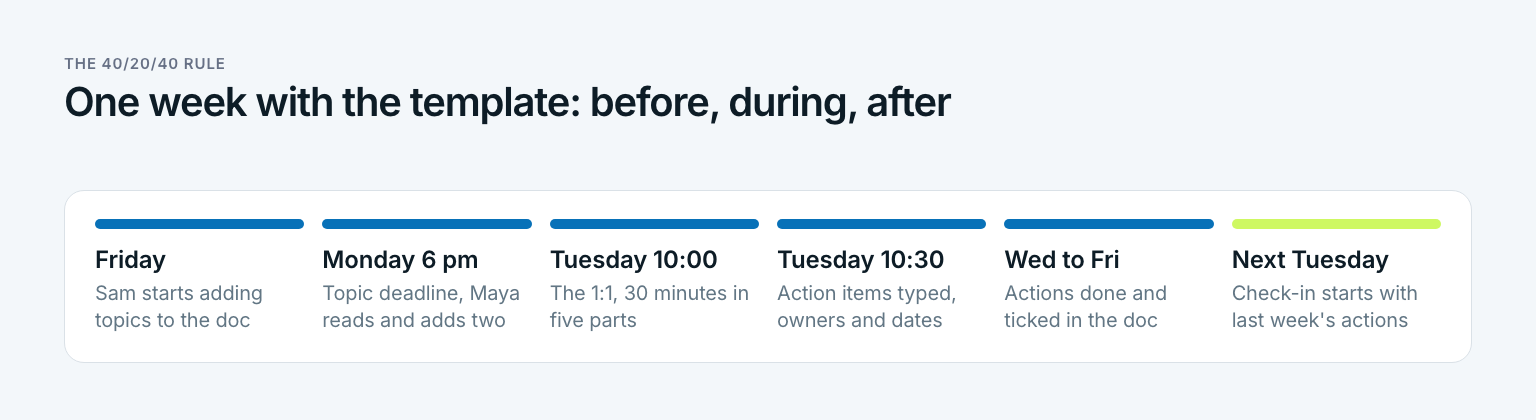
For Maya, the 40 before is ten minutes on Monday evening reading Sam's topics and adding two of her own. The 40 after is five minutes to tidy the action items and the habit of checking them at the next check-in. Neither shows up in the calendar. Both decide whether the 30 minutes in between were worth it. Here is how to set it up:
Create one running doc per report
Name it after both of you, for example Maya and Sam 1:1. Header on top, newest meeting below it. Give the report edit rights, because they write first.
Fill in the header together
Use the next 1:1 for it, 20 minutes. Do not fill it in alone and send it over. A header the report did not write is a job description, not an agreement.
Set a fixed slot and a topic deadline
Same day, same time, never cancelled, only moved. Topics are due the evening before. Maya and Sam use Tuesday at 10:00 and Monday at 6 pm.
Read the doc before the meeting
Ten minutes the evening before. Add your topics below the report's, at most two. If the report's list is empty, pick a prompt from the header.
Run the 30 minutes in order and write as you talk
Check-in, the report's topics, goal check, your topics, action items. Type the notes in the doc during the meeting, three lines per topic. Read the action items back before you hang up.
Close the loop at the next check-in
Start every 1:1 with last week's action items and fill in the status column. Every fourth week, switch to the growth questions. Review the header once a quarter when goals change.
Step six is the one that slips first. Without it, action items pile up in a doc nobody scrolls, and the template becomes a diary. Anyone who checks last week's actions in the first three minutes never has to ask whether 1:1s are working. The status column answers it.
The three mistakes that turn a template into a form
Templates rarely fail because the sections are wrong. They fail because of how they are used. Which of these three sounds like your last month of 1:1s?
The most common mistake: action items nobody reads again
Most templates end with an action items section and no place to check it. The result is a list that grows every week and gets read never. The fix costs three minutes: start each 1:1 with last week's items and fill in a status. An action item without a next check is a wish, not a commitment.
- The manager fills in the agenda. It feels helpful, and for a new report in the first two weeks it is. After that, a manager-written agenda turns the 1:1 into a status update with better formatting. Let the report write first and put your topics below theirs.
- Twelve sections instead of five. Long templates look thorough. They get filled in at 9:55 for a 10:00 meeting, and the answers stay thin. Five sections a week plus a monthly growth check is enough when each one asks a real question.
All three have the same root. The template stops serving the conversation and starts serving itself. In short: if the doc takes longer to fill in than the meeting takes to hold, cut it.
From the quarterly goal to Tuesday: the template in the goal chain
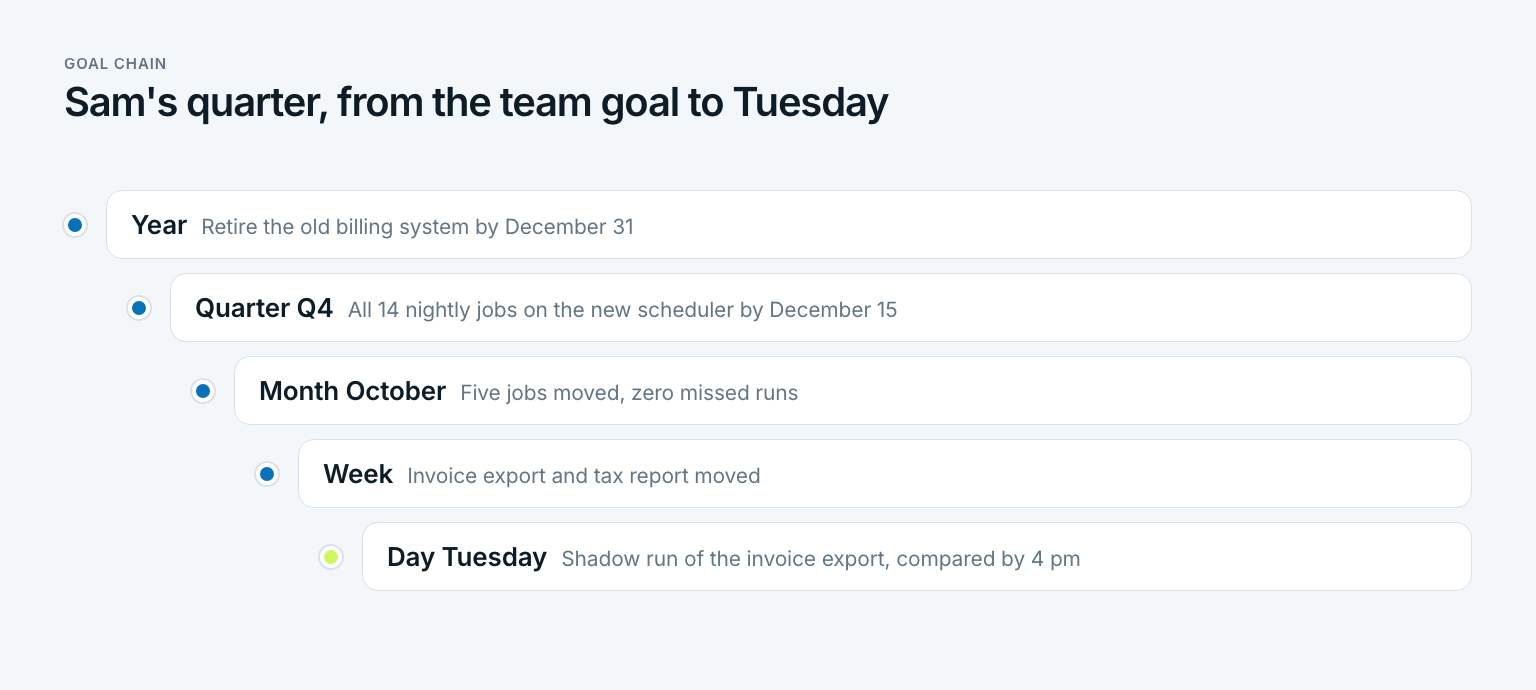
A 1:1 template with a quarterly goal in the header has one gap. Between the header and the weekly goal check sit twelve weeks, and the quarterly goal does not say what this week should look like. The goal chain closes that gap. It breaks the team's yearly goal into a quarterly goal per person, then a monthly goal, then a weekly goal, then a single task for the day.
For Sam, the chain runs from the team goal down to one Tuesday afternoon. The 1:1 checks the week, not the day. The day belongs to Sam's own list.
| Level | Goal | Where it shows up in the template |
|---|---|---|
| Year | Retire the old billing system by December 31 | Header, team goal this year |
| Quarter | All 14 nightly jobs on the new scheduler by December 15 | Header, goal this quarter |
| Month | Five jobs moved in October, zero missed runs | Monthly growth 1:1, goal question |
| Week | Invoice export and tax report moved | Weekly agenda, goal check |
| Day | Shadow run of the invoice export on Tuesday, output compared by 4 pm | Sam's own list, not the 1:1 |
With the chain in place, the eight minutes of goal check turn into one question with a number: three of 14 jobs, plan says four. Is that a problem? Not yet. It becomes one if the answer is the same next Tuesday, and both of you will see it on the same day.
In Gaapp, this chain is the core: a yearly goal, with quarterly, monthly, weekly, and daily goals underneath, each one attached to a bigger one. Whoever shares those goals with a report in a shared space walks into the 1:1 already knowing the number. If you need a starting point for the goals themselves, the SMART goals examples cover most roles.
Three questions before your next 1:1:
- Can your report name their quarterly goal, with the number, without opening the doc?
- How many of last week's action items were done, as a count and not a feeling?
- When did you last spend a full 1:1 on growth instead of work?
Anyone who answers one of these with a shrug does not need a longer template, but one that is used the same way every week. In short: a one-on-one meeting template is not paperwork for a meeting, it is the memory of a working relationship.
Questions about one on one meeting templates
How do you structure a 1 on 1 meeting?
Report first, manager second, actions last. A 30-minute 1:1 works well in five parts: check-in and last week's actions for three minutes, the report's topics for 12, a goal check for eight, the manager's topics for four, and action items for three. The report adds topics to a shared doc the evening before.
What is the 40/20/40 rule for meetings?
It is a planning rule of thumb: 40 percent of the effort goes into preparation, 20 percent into the meeting, and 40 percent into follow-through. For a weekly 1:1, it means the topics are in the doc before the meeting and the action items are done and checked after it. The 30 minutes in the room are the smallest part of the result.
How to write a 1 to 1 meeting?
Write in a running doc, one per report, with the newest meeting on top. For each topic, note what was said, what was decided, and any action item with an owner and a date, one line each. Read the action items back before you end the meeting, so both of you leave with the same list.
How to have a good one-on-one meeting?
Let the report own the agenda, keep a fixed slot you move but never cancel, and start every 1:1 with last week's action items. Ask a follow-up after the first answer, such as “And what else?” Once a month, swap the topic list for growth questions.
What should a one on one template include?
Four parts: a header with goals, career goal, and working agreements that you fill in once, a weekly agenda, a notes and action items section, and a monthly growth section. More sections make the doc longer, not better. The prompts in each section matter more than the layout.
Who should fill out the 1:1 meeting template, the manager or the employee?
Both, in different places. The report adds topics and the goal status before the meeting, the manager adds feedback and writes the action items during it. If only the manager writes in the doc, the 1:1 slowly turns into a status update.
Last updated: 19 October 2026
Read next
 Leadership & Teams
Leadership Styles: Which One Fits Which Situation
Leadership styles are not personality types: 11 types compared, Lewin, Goleman, situational leadership and five steps to find the style that fits you.
14 min read
 Leadership & Teams
Retrospective: How Teams Learn From Every Sprint
A retrospective is not a blame session: what the word means, five phases, seven retrospective examples and action items that stick, shown on one team.
16 min read
 Leadership & Teams
How to Delegate Tasks: Hand Off Work, Keep Results
Delegation is not dumping work: five levels of delegation, seven steps, a handoff script and what to keep, shown on one marketing team.
15 min read