Second Brain: How to Build One You Actually Use
A second brain is not a note archive: Tiago Forte's CODE steps, the PARA method with an example, a five-step setup and the mistakes that sink it.

Contents
- 01What is a second brain? Meaning and origin
- 02Why a second brain helps: three research findings
- 03The second brain method: CODE in four steps
- 04The PARA method: four folders instead of forty
- 05Building a second brain: a five-step setup
- 06Choosing a second brain app
- 07Second brain vs Zettelkasten
- 08Three mistakes that sink a second brain
- 09Second brain and your goals: the goal chain
- 10A three-question audit for your second brain
A second brain is not a folder of notes you will search through someday. It is a personal knowledge system, usually digital, that stores your ideas and information outside your head and organizes them around the projects you are working on right now. The term comes from Tiago Forte and his 2022 book Building a Second Brain. Your first brain is for thinking. Your second brain is for remembering, so the first one can do its job.
To keep this practical, the whole method is applied to one person. Priya teaches chemistry at a public high school in Columbus, Ohio. This year she is writing a grant for new lab equipment, running the spring science fair and applying for an instructional coach role in her district. Until August her notes lived in three apps, a spiral notebook and 412 open browser tabs. Below you get the meaning of the term, the CODE steps, the PARA method with her real folders, a five-step setup, an app comparison and the three mistakes that sink most second brains within a month.
What is a second brain? Meaning and origin
A second brain is a trusted place outside your head where you keep what you learn and what you might need later. It is not a specific app. It is a way of working: you hand the job of remembering to a system, and you keep the job of thinking for yourself. The system can be a notes app, a set of folders on your laptop or, in a pinch, a binder.
The idea is older than the name. In 1945 the American engineer Vannevar Bush described a desk-sized machine called the memex in his essay As We May Think. It would store a person's books, records and letters and let them follow trails of links between them. In 2001 David Allen argued in Getting Things Done that your mind is for having ideas, not for holding them. Tiago Forte combined both ideas with modern notes apps, first in online courses and essays and then in his book.
Forte's twist is simple and easy to miss. He does not organize knowledge by topic. He organizes it by use. Whoever saves a note in his system does not ask what it is about. They ask which project it will help with. That one question is the difference between a second brain and a pile of bookmarks. In short: a second brain is a workbench, not a museum.
For Priya this was the real news. For years she had folders called Teaching, Science and Ideas. Each held dozens of notes, and none of them showed up when she was actually writing a lesson plan. The material existed. It was just filed in the wrong place.
Why a second brain helps: three research findings
The main payoff of a second brain is a calmer head. That sounds vague, so here are three findings that make it concrete. None of them proves a notes app makes you smarter. Together they explain why offloading works anyway.
Your working memory is small. In a widely cited 2001 review, psychologist Nelson Cowan concluded that people can hold only about four chunks of information in mind at once. Anyone who is trying to remember a deadline, a book title and a half-formed idea while teaching a class has already used those slots. That means every note that sits safely outside your head frees up room inside it.
Open loops keep tugging at you. In a series of experiments published in 2011, E. J. Masicampo and Roy Baumeister found that unfinished goals interfered with focus on unrelated tasks. The interference disappeared once participants wrote down a specific plan for the open goal. They did not have to finish it. Whoever writes an open loop down with a next step quiets it before doing any of the work.
Your brain remembers where, not what. In a 2011 paper in Science, Betsy Sparrow, Jenny Liu and Daniel Wegner reported that people recalled information less well when they expected to be able to look it up later. They did remember better where it was stored. That is not an argument against a second brain, but it is a limit. What you need to know by heart belongs in your head. What you only need to find belongs in the system.
Priya draws that line clearly. The safety rules for her lab she knows cold, because she cannot look them up while a beaker is on fire. The district's grant rubric, 60 saved lesson ideas and her notes from coaching workshops go into the system. She does not need to know everything. She needs to know where it is.
The second brain method: CODE in four steps
The second brain method has four steps, and their initials spell CODE: Capture, Organize, Distill, Express. Forte describes them as a loop rather than a ladder. The first three steps only prepare. The fourth is where notes turn into results.
Capture: keep what resonates
Capture only what surprises you, is useful or moves you personally. Forte calls this capturing what resonates. You rarely need a whole article. Two paragraphs and the source name usually do the job. Priya used to save entire web pages and never open them again. Now she saves the one sentence that made her want to save the page.
It helps to have a single inbox. Everything lands there first, whether it is a voice memo, a photo of a whiteboard or a quote from a book. Sorting comes later. Anyone who sorts while capturing captures more slowly and eventually stops altogether.
Organize: by project, not by topic
Organizing means putting each note where it will be most useful next. Forte uses the PARA method for this, covered in detail in the next section. The rule behind it is short. A note goes where you will need it next, not where it belongs by subject.
Distill: progressive summarization
Distilling means shaping a note so your future self can see in 30 seconds why it mattered. Forte's technique for this is progressive summarization. Layer one is the captured text. In layer two you bold the key passages. In layer three you highlight the best of the bolded lines. In layer four you write two or three sentences at the top in your own words.
The trick is timing. You do not distill when you capture. You distill when you come back to a note. Notes you never need again cost you nothing. Notes you use often get better every time you touch them.
Express: turn notes into something you ship
Expressing means turning what you collected into something other people can see: a slide deck, a proposal, an article, a decision. Forte suggests working in intermediate packets. These are small reusable pieces such as an outline, a checklist or a single slide. Priya now has 17 of them, including a budget table she has reused in two grant drafts and a one-page summary of her teaching approach.
Without this step every second brain stays a hobby. Whoever only captures, sorts and highlights ends the year with a beautiful library and nothing more to show for it. That means you measure your system not by the number of notes but by the number of things that came out of it.
The PARA method: four folders instead of forty
The PARA method is the filing system inside a second brain. It has only four categories: Projects, Areas, Resources and Archives. Every note, file and document lives in exactly one of them. The order runs from most actionable to least actionable.
| Category | What goes in | Test question | Priya's example |
|---|---|---|---|
| Projects | Efforts with a goal and a deadline | When will this be done? | Lab equipment grant, due February 15 |
| Areas | Ongoing responsibilities with a standard but no end date | What do I need to keep up? | Classroom, personal finances, health |
| Resources | Topics you care about that might be useful later | Might I use this someday? | Lab demos, assessment design, running |
| Archives | Anything inactive from the other three | Is this finished or on hold? | Last year's science fair |
The distinction that matters most is between a project and an area. A project ends. An area does not. Your health is an area. The half marathon in April is a project. Whoever mixes the two ends up with folders like Fitness or Work that never finish and therefore never get cleaned out.
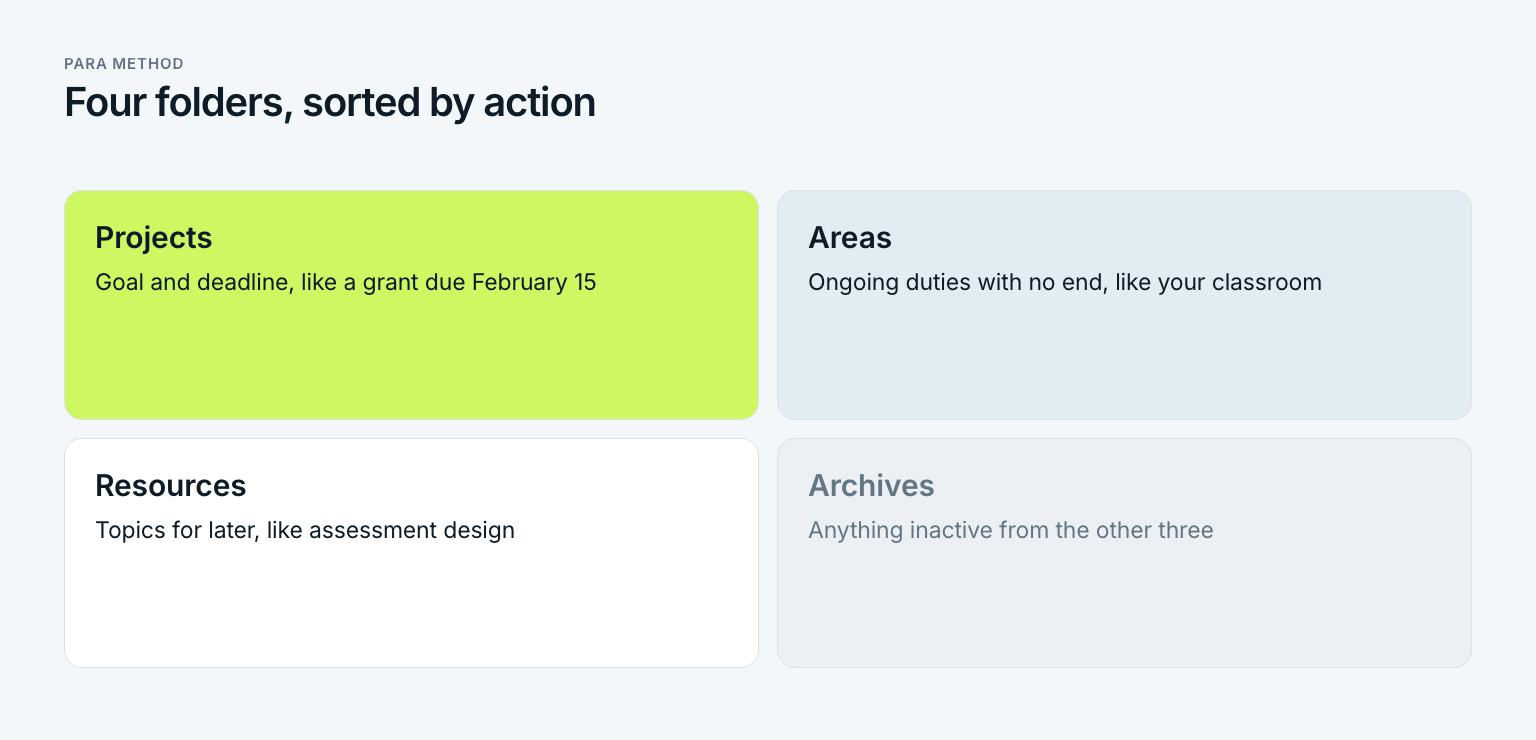
PARA is meant to move. When Priya submits the grant, its folder goes to Archives. Before that, she copies the best pieces, such as a paragraph on how she measures student outcomes, into her Resources folder on assessment design. Nothing is lost, and the active part of the system stays small. Today she has four project folders, four areas and nine resources. Before, she had 38 topic folders.
Rule of thumb: projects first
Whoever sets up PARA usually starts with Resources, because that is where most of the old material sits. That is the wrong order. Create your projects first, the ones you want to finish in the next three months. Everything else gets filed the first time you actually need it.
Building a second brain: a five-step setup
Building a second brain takes about two hours plus five minutes a day, not a month of migration. Priya did the following steps on a Saturday morning. She did not sort her old material at all. She moved it as one block.
Pick one app and commit
Choose a notes app you already know that runs on your phone and your laptop. The best app is the one you still open after four weeks. Priya chose the app she already used for grocery lists.
Create the four PARA folders
Make Projects, Areas, Resources and Archives your top level. Number them 1 to 4 so the order stays fixed. You do not need deeper levels yet.
List your active projects
Write down every effort with a goal and a deadline and give each one a subfolder. Priya had three: the grant, the science fair and the coach application. A fourth, a parent night presentation, came in November.
Archive your old notes in one move
Move every old note, bookmark and file, unsorted, into one archive folder named with today's date. Do not sort it. When you need something from it, pull out that one piece.
Set an inbox and a weekly review
Decide on one place where everything new lands and one fixed time each week to empty it. Priya clears her inbox on Fridays at 3:30 p.m. in about 15 minutes and moves each note into a project, an area, a resource or the trash.
Step four feels wrong and matters most. Whoever insists on sorting everything old before the new system may start never starts. Priya's archive from August still holds about 900 unsorted notes. In three months she has needed nine of them and filed exactly those nine.
The weekly review is the other half of the inbox. Without it, the inbox becomes a fifth folder that only grows. If you know Getting Things Done, the logic will sound familiar: capturing and processing are separate steps, and only regular processing makes capturing trustworthy. GTD applies that logic to tasks. A second brain applies it to knowledge.
A week inside a working second brain
What does the method feel like once the frame is in place? Less dramatic than most people expect. Most of the time you hardly notice it. It shows up in the moments when you would otherwise have gone hunting. Here is Priya's second week of November:
- Monday: A colleague mentions a cheap spectroscopy demo during lunch. Priya types two lines into her inbox. Time spent: one minute.
- Tuesday: For the grant's outcomes section she opens the project folder and finds four saved notes on measuring lab skills. She reads only the bolded lines and drafts the section in 35 minutes.
- Wednesday: A podcast on feedback has one line she likes. She saves it to her Resources folder on assessment design without editing it.
- Thursday: For the parent night slides she reuses her one-page teaching summary instead of writing it again.
- Friday: Weekly review at 3:30 p.m. Fourteen notes in the inbox. Nine go to projects, three to resources, two to the trash.
Notice what is missing. Priya renamed no folders, added no tags and saved no full articles. The system cost her a few minutes a day and saved her close to an hour on Tuesday and again on Thursday. Whoever never has moments like these has either captured too little or captured the wrong things.
Choosing a second brain app
The best app for a second brain depends less on features than on your habits. Forte himself stresses that the method works in almost any notes app. Still, tools differ in three ways that matter: where your data lives, how fast you can capture on your phone and how well notes link to each other.
| Tool | Strength | Weakness | Good fit for |
|---|---|---|---|
| Notion | Databases, templates, team sharing | Slower for quick capture on the go | People who plan projects and notes together |
| Obsidian | Local Markdown files, strong linking | More setup, paid sync for some users | People who want to own their files |
| Evernote | Fast capture, web clipper, solid search | Free plan is heavily limited | People who clip a lot from the web |
| Your phone's notes app | Always with you, no setup | Little structure for many projects | Starting small |
| Paper and binders | No notifications, no updates | No search, hard to carry everywhere | Small systems with few projects |
Priya tried two apps and kept the one that opens fastest on her phone. That is a good test. Whoever needs more than three taps between an idea and a saved note will lose a lot of ideas in the hallway. Switching only makes sense once you can name exactly what is missing after three months.
A word on AI features. Many apps can now summarize notes or answer questions about your material. That can shorten the distill step. It cannot replace it. A summary you never wrote yourself is easy to skim past when the next project comes around.
Second brain vs Zettelkasten
A second brain and a Zettelkasten get mixed up because both are built from notes. They solve different problems. The Zettelkasten method, the slip box of the sociologist Niklas Luhmann, is a tool for thinking: you write ideas in your own words and link them until new insights appear. A second brain is a tool for delivering: it sorts material by project so you finish faster.
Anyone writing a book or developing one research question over years is better served by a Zettelkasten. Anyone feeding material to many parallel projects needs PARA. The two can live side by side, and a slip box can simply be one resource inside your second brain. In short: a Zettelkasten asks what you think. A second brain asks what you need right now.
Three mistakes that sink a second brain
Most second brains do not fail because of the wrong app. They fail because of three habits that feel productive and change very little. Do you recognize one of them?
Mistake 1: capturing without a project
Capturing feels good. Every saved note feels like progress, even though nothing has happened yet. Whoever saves articles, podcasts and quotes without linking them to a project builds storage, not a tool. Priya gave herself one rule: anything she cannot assign to a project or an area during the weekly review goes to Resources or the trash, never back into the inbox.
Mistake 2: maintaining the system instead of using it
Renaming folders, adding tags, building templates: all of this is work on the system, not work with it. A little is necessary. But whoever spends an hour every Sunday on structure and pulls nothing out during the week is confusing maintenance with productivity. As a rough limit, more than 30 minutes of upkeep a week is a warning sign.
Mistake 3: never expressing anything
The third mistake is the most expensive. If you never build a document, a presentation or a decision from your notes, you never learn which notes are worth keeping. The system grows but does not improve. That means you plan the express step on purpose, for example one intermediate packet a week.
The most common mistake: collecting becomes the goal
Whoever measures success by the number of notes has confused the means with the end. A second brain is only good if something regularly comes out of it. That is why Priya asks a single question every Friday: what did I make this week that came from my notes?
Second brain and your goals: the goal chain
A second brain is organized by projects. Projects come from goals. Whoever skips that link ends up organizing knowledge around efforts they never consciously chose. So how do you know which projects deserve a folder at the top? The goal chain answers it: year, quarter, month, week, day.
Here is how it looks for Priya. Her yearly goal is to start as an instructional coach in fall 2027. For the fourth quarter of 2026 that means submitting the grant and filming two demo lessons for her application. In November it becomes two project folders in PARA and three finished intermediate packets. For the week she plans to draft the grant budget from her saved notes. On Tuesday she writes the budget rationale from 6:30 to 7:15 a.m., before first period.
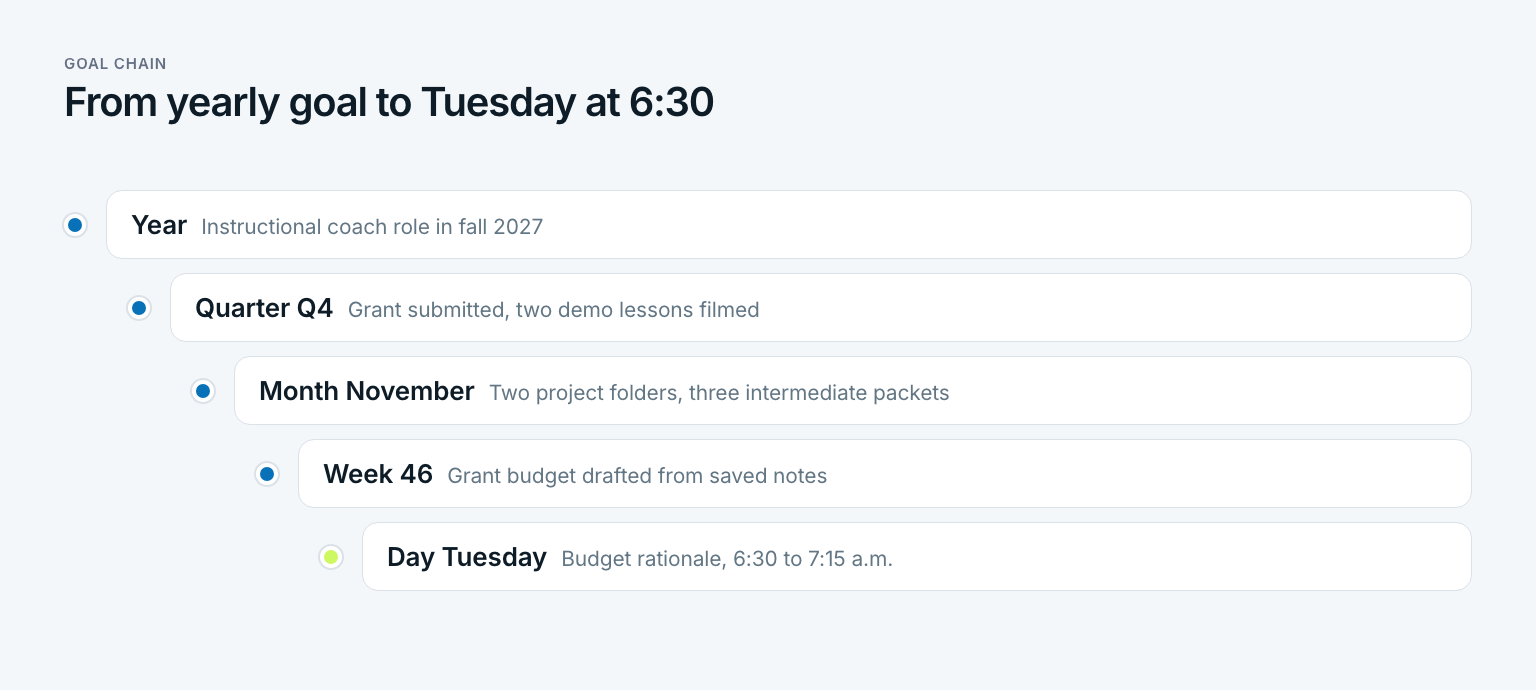
So the goal chain decides which projects exist in your second brain in the first place. The second brain, in turn, supplies the material that makes each daily step faster. If you want to see how to break a yearly goal down cleanly, read how to turn yearly goals into daily steps. Notes are still not a plan. Appointments and tasks belong in a system for getting organized, not between two quotes.
There is a useful side effect. Whoever checks their project folders against their goals once a quarter finds dead weight. In October Priya found two project folders with no goal behind them anymore. Both went to Archives, and her active list got short again. For the bigger picture on planning goals that hold all the way down to the day, see how to achieve goals.
A three-question audit for your second brain
You cannot judge a second brain by its size. Three questions, asked once a month, tell you whether it works:
- Can I find any note in under a minute? If not, it is probably filed by topic instead of by project.
- Does every project folder belong to a current goal? If not, move it to Archives.
- What did I make this month from my notes? If the answer is nothing, the express step is missing.
In October Priya answered the third question with a short list: the grant draft, the parent night slides and a two-page teaching philosophy for her application. A year ago she would have said she read a lot. A second brain, in the end, is not where your knowledge is stored. It is where your work gets finished faster.
How do you rest your brain?
Rest usually means sleep, breaks away from screens and time without new input. A second brain helps in a narrower way: once open tasks and ideas are written down with a next step, they intrude less on your attention, as Masicampo and Baumeister found in 2011. It supports a calmer head but does not replace sleep or real breaks.
Does a second brain make your memory worse?
Research by Sparrow, Liu and Wegner in 2011 suggests people remember less of what they expect to look up later, but remember better where it is stored. So keep what you must know by heart in your head and use the system for material you only need to find. Used that way, a second brain frees attention rather than replacing learning.
What is the second brain method?
The second brain method by Tiago Forte runs in four steps called CODE: Capture, Organize, Distill and Express. Notes are organized with the PARA method by how actionable they are. The goal is to turn saved knowledge into finished work, not to build an archive.
What is the PARA method?
PARA stands for Projects, Areas, Resources and Archives. Projects have a goal and a deadline, areas are ongoing responsibilities without an end date, resources are topics for later and archives hold anything inactive. Every note lives in exactly one of the four.
What is the best app for a second brain?
The method works in almost any notes app, including Notion, Obsidian, Evernote or the notes app on your phone. Fast capture on your phone and a search you trust matter more than features. Pick the app you already use and stay with it for at least three months.
How long does it take to build a second brain?
The basic setup takes about two hours: pick an app, create the four PARA folders, list your projects and archive old notes unsorted. After that the system grows through daily capture and a weekly review of about 15 minutes. After roughly a month you will know whether the structure fits your work.
Last updated: 22 October 2026
Read next
 Productivity
Feynman Technique: Four Steps to Real Understanding
The Feynman technique is not a memorization trick: four steps, a worked example from a stats class, a one-page template, and what research says.
16 min read
 Productivity
Zettelkasten: How to Turn Notes Into Your Own Ideas
A Zettelkasten is not an archive: Luhmann's method, the three note types, a five-step setup and an Obsidian template, with a worked example.
15 min read
 Productivity
Kaizen Method: How Small Changes Add Up
The kaizen method explained: meaning, origins, principles, six steps and a worked example from a bookkeeping practice, plus personal kaizen for your goals.
15 min read