Zettelkasten: How to Turn Notes Into Your Own Ideas
A Zettelkasten is not an archive: Luhmann's method, the three note types, a five-step setup and an Obsidian template, with a worked example.

Contents
- 01What is a Zettelkasten? Meaning and origin
- 02Luhmann's Zettelkasten: how the original worked
- 03The three types of notes in the Zettelkasten method
- 04How to start a Zettelkasten in five steps
- 05Obsidian Zettelkasten: a simple setup that works
- 06Zettelkasten vs other note-taking systems
- 07Three mistakes that kill a Zettelkasten
- 08From notes to finished writing
- 09Zettelkasten and your goals: the goal chain
- 10Who a Zettelkasten is for
A Zettelkasten is not a place to store everything you read. It is a note-taking system built from short notes, one idea per note, written in your own words and linked to other notes so that new ideas and finished writing can grow out of them. The German word means slip box. An archive keeps things. A Zettelkasten works with you.
The method became famous through the sociologist Niklas Luhmann, who filled his slip box with roughly 90,000 notes and wrote about 70 books from it. Below you will see it applied to Marcus, a product manager in Denver who publishes a weekly newsletter on product strategy and wants to ship 40 issues this year. You also get the three note types, a five-step setup, a simple Obsidian Zettelkasten, a comparison with other note-taking systems and the three mistakes that end most slip boxes within a month.
What is a Zettelkasten? Meaning and origin
A Zettelkasten is a collection of notes kept under a fixed system of addresses and links. The word describes two things at once: a physical box of index cards and the way of working behind it. The method runs just as well in an app as on paper. What matters is not the material but three rules: one idea per note, one permanent address per note, at least one link per note.
In English the method is often called the slip box, a term made popular by Sönke Ahrens in his 2017 book How to Take Smart Notes. Many people simply keep the German word. Either way, the label hides the important part. A box of recipe cards is also a box of slips. It is built for finding things again, not for thinking.
What separates a Zettelkasten from a card file is the links. Every note points to other notes, and those connections are where ideas appear that were not in any single source. In short: a card file sorts, a Zettelkasten connects.
The idea is older than Luhmann. Scholars in the 16th century already worked with loose slips of excerpts, and the Swiss naturalist Conrad Gessner is often named as one of the first to describe the practice. The modern method, though, is tied to one German professor and one remarkable output.
Luhmann's Zettelkasten: how the original worked
Niklas Luhmann taught sociology at Bielefeld University from 1968 to 1993. He started his Zettelkasten in the early 1950s and kept it going for more than four decades. By the end it held about 90,000 notes in two collections, which the Niklas Luhmann Archive at Bielefeld University has since digitized and put online. Over the same period he published around 70 books and close to 400 articles.
Luhmann did not treat the box as storage. In his 1981 essay on communicating with slip boxes, he describes it as a partner that surprised him with connections he had not planned when he wrote the individual notes. That is the heart of the method. Anyone who only files gets back what they put in. Anyone who links gets back more.
A quick bit of arithmetic shows the pace. 90,000 notes over roughly 45 years comes to about 2,000 notes a year, or five to six notes every single day. That sounds like heroic effort. It is mostly consistency. Whoever writes a few notes every day ends up with more raw material after ten years than someone who takes a week of notes once a year.
Fixed addresses instead of folders
Luhmann did not sort notes by topic. He sorted them by number. A new idea that continued note 21 became 21a. An idea that extended 21a became 21a1. That way any note could grow a branch at any point, and he never had to commit to a folder structure. The number is an address, not a category. That means: a note does not need to know where it belongs. It only needs to know what it follows.
Links and a sparse index
On top of the numbering, Luhmann wrote the numbers of related notes onto many cards, even when those notes sat in a completely different part of the box. A keyword index pointed to only a handful of entry notes per term, not to every mention. From there he followed the links. The box was never a dictionary you look things up in. It was a network you move through.
| Element | What Luhmann did | What it is for | Digital version |
|---|---|---|---|
| Note | One idea per slip of paper, written out in full | Each idea stays linkable on its own | One note per file |
| Fixed address | 21, 21a, 21a1, assigned by what a note follows | Every note can be found and cited | Unique ID or timestamp |
| Link | Numbers of related notes written on the card | Connections across topics | Link between two notes |
| Index | A few entry notes per keyword | A way into the network | Structure note or index note |
| Bibliography | Sources with brief notes, kept separately | You always know where an idea came from | One literature note per source |
The three types of notes in the Zettelkasten method
The Zettelkasten method sorts notes by how long they live. Ahrens describes three types: fleeting notes, literature notes and permanent notes. Only the third type goes into the box for good. The other two are raw material that you process and then delete or file separately.
| Note type | When you write it | How long it lives | Example from Marcus |
|---|---|---|---|
| Fleeting note | On the go, in meetings, while reading | A day or two, then processed or deleted | Phone note after a customer call: they only churned after the second price change |
| Literature note | While reading a source | Kept, but outside the box | Four bullet points on a chapter about pricing, each with a page number |
| Permanent note | While processing, in your own words | Permanent, linked to other notes | Note 31c: users forgive one price change, not two in a year |
Most people stop after the second type. They highlight books, paste quotes into an app and call it a system. Whoever works that way ends the year with a long list of other people's sentences. A permanent note is different. It is a claim you can stand behind, written so clearly that you will still understand it in five years without opening the source. Whether you understand an idea well enough shows in a test borrowed from the Feynman technique for learning: explain it in plain words, as if to a beginner.
Marcus's note 31c shows how that works. It came from a fleeting note after a customer call and two literature notes on pricing. None of the three contained that sentence. It is his own idea, and it only appeared when he sat down to process. That is the whole point of the method.
Structure notes and hub notes
Once a box holds a few hundred notes, it needs entry points. Many practitioners use structure notes for this: notes that contain nothing but an ordered list of links to other notes, such as the outline of an article or an overview of one concept. They play the role of Luhmann's index, only in more detail. Anyone who builds a structure note sees right away where a topic is dense and where it still has gaps.
How to start a Zettelkasten in five steps
A new Zettelkasten does not need a software decision or a clever folder tree. It needs five habits, which Marcus practiced in his first week in January. So what does a real start look like?
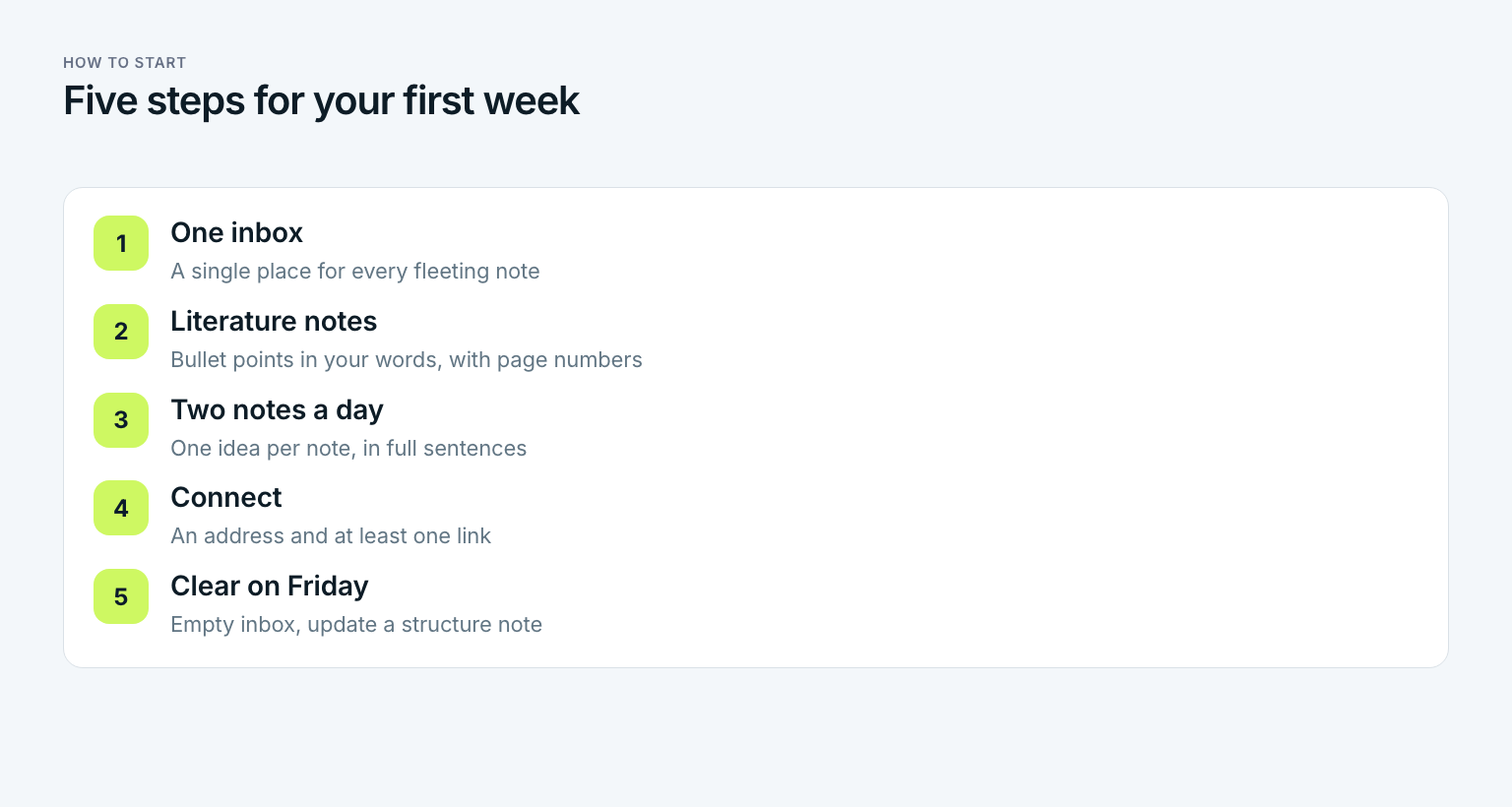
Pick one inbox
Choose a single place for fleeting notes, such as a pocket notebook or a notes app on your phone. Marcus uses his phone, because most ideas reach him on calls and walks. Everything lands there with no structure and no standard to meet.
Write literature notes while you read
For every source, write a few bullet points in your own words, with page numbers. No long quotes, no highlights without a note. Marcus averages four lines per book chapter or long article.
Write two permanent notes a day
Block 30 minutes every workday. Go through your fleeting and literature notes and turn the best two into permanent notes. One idea each, full sentences, written as if you were explaining it to a colleague.
Connect every note
For each new note, ask which existing note it follows and which one it contradicts. Give it an address based on that and add at least one link. A note without a connection is a lost note.
Clear the inbox once a week
Every Friday, empty the inbox completely. Whatever has not been processed by then gets deleted. Then create or update a structure note for the topic you are currently writing about.
After his first week, Marcus had ten permanent notes and had deleted about 30 fleeting ones. That ratio is normal. Anyone who keeps every scrap builds a pile, not a network. The Friday cleanup fits neatly at the end of a regular review, and the ten-minute weekly review shows how to keep that short.
Order matters here. If you start with step three and have no inbox, the best ideas get lost between meetings. If you start with step five, you are tidying an empty system. Marcus spent his first week tracking one thing only: did he write two notes on five days? Everything else came in week two.
Obsidian Zettelkasten: a simple setup that works
Is Obsidian based on Zettelkasten? Not exactly. Obsidian is a general note-taking app that stores notes as plain Markdown files in a folder on your computer. It was not designed only for the slip box. It works very well for one, though, because it creates links between notes with double square brackets and shows backlinks automatically. Marcus set up his Obsidian Zettelkasten with four decisions:
- Three folders, no more. Inbox for fleeting notes, Sources for literature notes, Notes for permanent notes. There are no topic folders. Structure comes from links.
- One ID per note. Every file name starts with a timestamp such as 202601141032, followed by a short title phrased as a claim. Obsidian ships with a core plugin that creates new notes with a timestamp.
- One template. Each note has three parts: the idea in three to eight sentences, the source, and a line of links with a short reason for each link.
- No extra plugins for the first eight weeks. The graph view looks impressive, but it has never written a single note.
Paper still has a case. Luhmann used index cards because he had no choice, but paper has one real advantage: you cannot copy and paste, so you are forced to put ideas in your own words. Software wins on links, search and access from any device.
| Criterion | Index cards | Digital, such as Obsidian |
|---|---|---|
| Effort to write | High, every sentence needs thought | Low, copying is tempting |
| Links | Write the address by hand | One click, backlinks shown automatically |
| Search | Only through the index and links | Full-text search across every note |
| On the go | Only if you carry cards | On every device |
| Longevity | Decades, no updates | Depends on the file format |
| Cost | A box and cards, once | Often free, sync sometimes paid |
Obsidian is not the only option. Logseq, Zettlr and The Archive all support the same workflow. The choice matters less than people think. Whoever writes two notes every workday for three months will have a working slip box in any of them. Whoever spends three months comparing apps will have none.
Zettelkasten vs other note-taking systems
What is the best note-taking system for work? It depends on what the notes are for. Each popular system is built for a different job, and none of them is wrong. The question is which job you have.
| System | Built for | Use it when |
|---|---|---|
| Zettelkasten | Developing your own ideas over years | You regularly write, teach or present |
| PARA, from Tiago Forte | Sorting material by project and area | You need to find files and references fast |
| Cornell method | Reviewing lectures and meetings | You study or sit in many briefings |
| Boxing method | Grouping related points on one page | You take notes by hand in a single session |
| Getting Things Done | Capturing and finishing tasks | Your problem is open loops, not ideas |
The boxing method, which often comes up as the box method for note taking, has nothing to do with the slip box. You draw boxes around related points on a single page during a lecture or meeting. That is useful for one session. A Zettelkasten is built for the opposite: ideas that keep growing across hundreds of sessions.
PARA, which Tiago Forte describes in Building a Second Brain from 2022, organizes information by project, area, resource and archive. It answers the question of where something is. A Zettelkasten answers what you think about it. Getting Things Done manages tasks, which are things that get finished. A slip box manages ideas, which are things that grow. Many people run one system for tasks and one for ideas, and that split works well.
Three mistakes that kill a Zettelkasten
Most slip boxes do not die because of the wrong app. They die because of three habits that feel productive and change nothing. Marcus hit two of them in his first month.
Mistake 1: collecting instead of thinking
Collecting is the pleasant part. An article goes into the inbox, a quote goes into Sources, a video goes onto the watch list. Three months later there are 800 items in the system and not one original thought. Anyone who measures progress by the number of saved notes is measuring how well they copy.
The most common mistake: quotes instead of your own sentences
Whoever fills the box with quotes postpones the thinking. Later rarely comes. A permanent note is only finished when it states the idea in your words and links to at least one other note. Marcus tests every note with one question: could I say this sentence on a podcast without the source in front of me?
Mistake 2: topic folders instead of links
Anyone used to office filing builds folders by reflex: pricing, onboarding, retention. Folders force every idea into exactly one drawer. An idea about trust after a price change belongs in all three. A Zettelkasten is built for those overlaps. A link can show them. A folder cannot.
Mistake 3: no goal for the box
Luhmann did not write notes into the void. His box served the books and papers he was working on. Without that kind of goal, there is no test for which note is worth writing. So everything gets kept, because everything might be useful someday. That means: a Zettelkasten without a project is a hobby. A Zettelkasten with a project is a workshop.
From notes to finished writing
The real payoff shows up when you write. If you start with a blank page, you have to find ideas, order them and phrase them all at once. If you start with a slip box, the ideas are already phrased. You only have to arrange them. That is the difference between a blank page and a stack of finished paragraphs.
In May, Marcus wrote issue 17 of his newsletter, on why the second price change hurts more than the first, in four moves:
- Open the structure note. He pulls every note linked to pricing, churn and trust. There are 14.
- Set the order. He arranges the 14 notes into one line of argument and cuts four that belong in a different issue.
- Mark the gaps. In one spot a step is missing. That becomes a reading task for next week.
- Write the transitions. The remaining ten notes are already paragraphs. He writes the sentences between them and smooths the tone.
The draft of about 1,200 words took him 90 minutes. Before the slip box, a comparable issue had cost him most of a Sunday. The method did not do magic. The thinking simply happened earlier, spread across many 30-minute sessions. In short: a Zettelkasten does not save you the thinking. It moves the thinking to days when it is easier.
That thinking needs focus. Notes written between two meetings come out shallow. Marcus put his 30 minutes in a fixed block before work, ahead of email and Slack. It is the same principle Cal Newport calls deep work: demanding thinking in planned, uninterrupted blocks.
And the four notes he cut? They stayed in the box. Two of them turned up again in issue 29, through a link Marcus had forgotten he made. That is exactly the moment Luhmann described when he called his box a conversation partner.
Zettelkasten and your goals: the goal chain
A Zettelkasten answers how you think. It does not answer what for. A goal chain that runs from the yearly goal down to today closes that gap. For Marcus it looks like this:
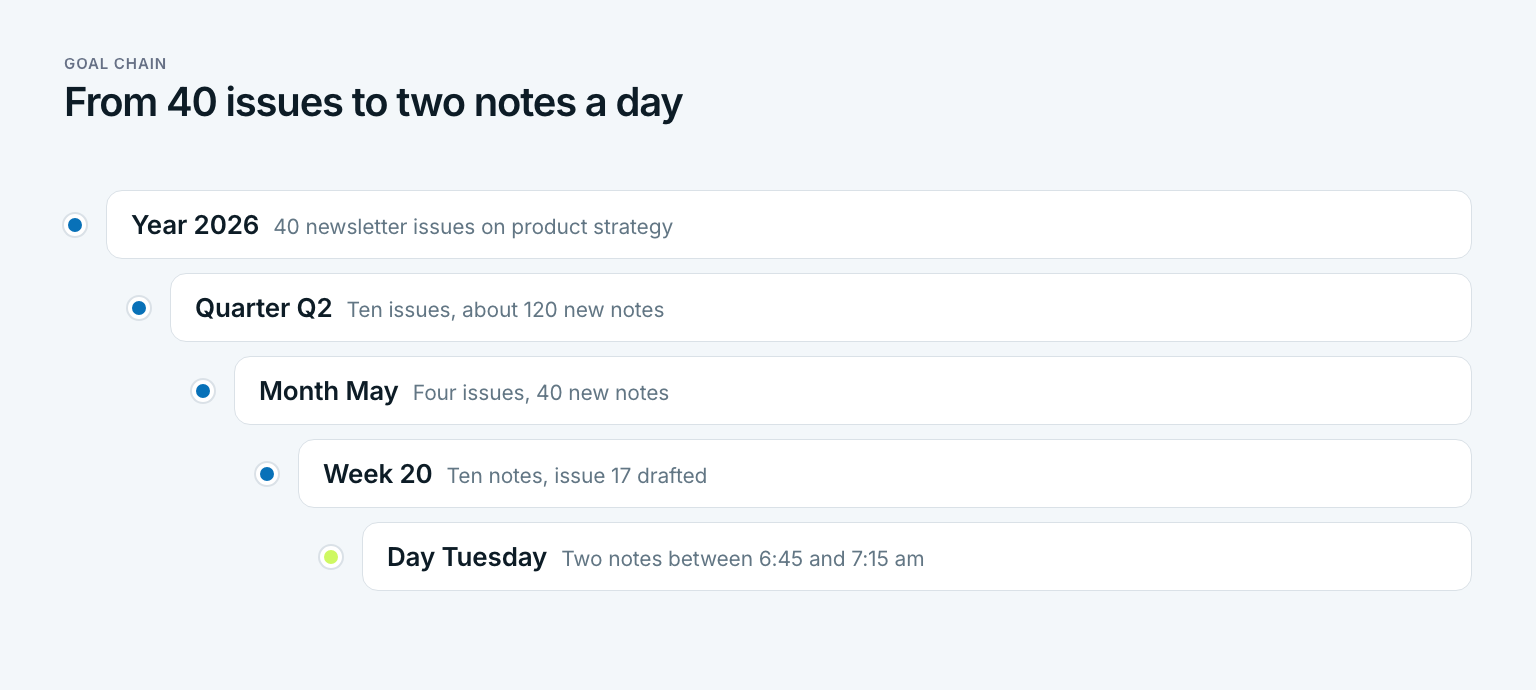
- Year 2026: 40 newsletter issues on product strategy, each built from the slip box.
- Quarter Q2: ten issues published, about 120 new permanent notes.
- Month May: four issues, 40 new notes, one structure note per issue.
- Week 20: ten new notes and issue 17 drafted from its structure note.
- Day Tuesday: two permanent notes between 6:45 and 7:15 am, each with at least one link.
The numbers fit together. Two notes on five days make ten a week, about 40 a month and about 120 a quarter. Once you know your daily rate, you can work out when an issue or a chapter has enough material. The slip box sits at the bottom of the chain. It is the daily action that carries the yearly goal.
Without the chain above it, Marcus would write notes about whatever caught his attention that morning. With it, he knows which issue needs material next. In Gaapp the daily step sits right under the weekly goal, so the question of what to think about is settled before he sits down. If you want to break your own yearly goal down this way, the guide on how to turn yearly goals into daily steps walks through it.
One more boundary helps. A journal records what moves you. A Zettelkasten records what you understand. Whoever pours both into the same app loses track of each.
Who a Zettelkasten is for
A Zettelkasten pays off for anyone who regularly turns reading into something of their own: students with papers and theses, researchers, writers, journalists, consultants, coaches with their own frameworks, and newsletter writers like Marcus. For them it is a tool that gains value every year. People who read a lot but rarely write get less out of it. People who mainly need to look up facts are better served by a search engine or a wiki.
A Zettelkasten is also not a replacement for a to-do list or a calendar. Turning appointments and tasks into notes creates a system that neither reminds you nor helps you think. Before you start, answer three questions:
- What should exist twelve months from now because of your box: an article series, a talk, a thesis?
- When exactly will you write your notes on five days a week?
- How will you know after four weeks that the box is working and not just growing?
If you cannot answer the first question, start with the goal, not the box. If you can answer all three, you only need a place for the notes and 30 minutes a day. In short: a Zettelkasten is not storage for knowledge. It is a workshop for your own ideas.
What are the different types of notes used in the Zettelkasten method?
There are three main types: fleeting notes for quick capture, literature notes that summarize a source in your own words, and permanent notes that hold one idea and link to other notes. Many people add structure notes, which are ordered lists of links that act as an outline or index. Only permanent and structure notes live in the box for good.
Is Obsidian based on Zettelkasten?
No. Obsidian is a general note-taking app that stores Markdown files locally and makes linking between notes easy. That makes it a good fit for a Zettelkasten, but the app does not enforce the method. Whether it becomes a slip box depends on how you write: one idea per note, your own words, deliberate links.
What is the box method for note taking?
The box method, also called the boxing method, groups related points inside drawn boxes on a single page during a lecture or meeting. It is meant for one session and makes reviewing easier. It is different from the slip box method, which links individual notes over months and years.
What is the best note-taking system for work?
It depends on the job. PARA works well for finding project files fast, Getting Things Done for tasks and open loops, and the Cornell method for meetings you need to review. A Zettelkasten is the best fit when your work involves developing ideas, such as writing, strategy or teaching.
How many Zettelkasten notes should I write per day?
There is no fixed number. Two thoughtful notes on five days a week add up to around 500 a year, which is plenty for many articles or a book. Quality matters more than volume: each note should hold one idea of your own and at least one link.
Is a Zettelkasten the same as a second brain?
Not quite. A second brain in Tiago Forte's sense organizes information by projects and areas so you can find it when needed. A Zettelkasten links individual ideas so that new ideas and writing grow out of them. Many people use both: project folders for material and a slip box for their own thinking.
Last updated: 22 October 2026
Read next
 Productivity
Feynman Technique: Four Steps to Real Understanding
The Feynman technique is not a memorization trick: four steps, a worked example from a stats class, a one-page template, and what research says.
16 min read
 Productivity
Second Brain: How to Build One You Actually Use
A second brain is not a note archive: Tiago Forte's CODE steps, the PARA method with an example, a five-step setup and the mistakes that sink it.
15 min read
 Productivity
Kaizen Method: How Small Changes Add Up
The kaizen method explained: meaning, origins, principles, six steps and a worked example from a bookkeeping practice, plus personal kaizen for your goals.
15 min read