Time Blocking: How to Plan Your Week in Blocks
Time blocking gives every important task an appointment with yourself. Six steps, a worked week with real hours, a free template, and the ADHD version.
Contents
- 01What time blocking means in simple terms
- 02Time blocking, timeboxing, task batching, and day theming: what each is built for
- 03What really happens to your week: busy is not blocked
- 04The time blocking method in six steps
- 05Marcus's blocked week: the worked example
- 06Time blocking in your goal chain: year, quarter, month, week, day
- 07Is time blocking actually effective? What the evidence says
- 08Time blocking for ADHD: where it helps and where it hurts
- 09The three mistakes nobody notices
- 10A free time blocking template, on paper or in your calendar
- 11Three questions before you block next week
- 12Frequently asked questions about time blocking
Time blocking is not a full calendar. It is the practice of deciding in advance which hours of your week belong to which work, then writing those decisions into your calendar as blocks before anyone else fills the space. A to-do list says what you want to do. A time block says when you will do it, and for how long. The difference sounds small. It is the whole method.
Three things make a block hold: a goal it serves, a start and end time, and a rule for what happens when the day breaks it. Below you get the method in six steps, a template you can copy into any calendar, and a worked week from Marcus, a senior product designer in Denver who had seven hours of design time last week and spent them in eleven pieces. His before and after week is where the numbers in this article come from. The method is worked through on a real week, not on a quote from a billionaire.
What time blocking means in simple terms
Time blocking means you give every important task an appointment with yourself. Instead of a list of twenty items that compete for the same open day, you have a day divided into named blocks: 9:00 to 11:00 onboarding screens, 11:00 to 11:30 email, 13:00 to 14:00 design review. Each block answers two questions before the day starts. What am I working on? Until when?
The method is older than the term. Benjamin Franklin planned his days in hourly segments in the 1700s, and his schedule page in the Autobiography is a time blocked day. Cal Newport made the term popular with Deep Work in 2016 and later built a paper planner around it. The idea underneath is simple. Attention follows the calendar, not the list. Whoever leaves the calendar empty hands the hours to whoever asks first.
That means: a block is a decision made once, in a calm moment, instead of forty small decisions made under pressure. The value of the method is not that you work more hours. It is that the hours you already have stop leaking.
Time blocking, timeboxing, task batching, and day theming: what each is built for
Four terms travel together, and most guides blur them. None of them is wrong. Each is built for a different problem.
| Method | What it fixes | How it works | Typical length |
|---|---|---|---|
| Time blocking | Work that never gets a slot | Reserve a calendar block for one kind of work and protect it | 60 to 180 minutes |
| Timeboxing | Work that expands to fill the day | Set a hard maximum and stop when the box ends, finished or not | 15 to 90 minutes |
| Task batching | Small tasks that interrupt all day | Collect similar small tasks and do them in one block | 30 to 60 minutes |
| Day theming | Context switching across projects | Give each weekday one type of work | a full day |
Timeboxing is the stricter cousin. A time block says you will work on the proposal from 9:00 to 11:00. A timebox says the proposal gets two hours and ships at 11:00 in whatever state it is in. Parkinson's law, named after Cyril Northcote Parkinson's 1955 essay, says work expands to fill the time available. A timebox is the countermeasure. Task batching is what you do inside a block: ten Slack replies, five expense receipts, three calendar invites, all in the 11:00 slot. Day theming is time blocking at the scale of a week, and it only works for people who control most of their calendar.
Block, box, batch
A block reserves time for a type of work. A box caps the time a task may take. A batch groups small tasks into one block so they stop scattering. Most weeks need all three: blocks for deep work, boxes for tasks that would otherwise grow, batches for the noise. Marcus's week below uses all three, and the table at the end labels which is which.
Anyone who tries to timebox their deep work usually ends up frustrated, because creative work rarely finishes on the bell. When a deep block goes well, it can tip into a flow state, and a bell would cut it off at the worst moment. Anyone who tries to time block their email usually ends up with a two hour block that should have been a 30 minute box. Matching the tool to the work is the first skill of the method.
What really happens to your week: busy is not blocked
A full week feels like a productive week. That is the trap. Marcus is 34, a senior product designer at a 60-person software company, fully remote. His yearly goal is to ship the redesigned onboarding flow and to be promoted to design lead at the review in January. His monthly goal for October: all nine onboarding screens approved and handed to engineering by October 30. He thought he was on track. Then he tracked one week.
| Where Marcus's 40 hours went in week 40 | Hours | Serves the monthly goal? |
|---|---|---|
| Meetings, including four recurring ones he does not speak in | 14.5 | Partly, about 4 hours |
| Slack and email, checked throughout the day | 9 | No |
| Design work on the onboarding screens, eleven sessions, longest 38 minutes | 7 | Yes |
| Reviews and feedback for two other teams | 4 | No |
| Admin, expenses, prep for one on ones | 2.5 | No |
| Unaccounted, mostly switching between the above | 3 | No |
| Total | 40 | About 11 of 40 hours |
Seven hours of design in eleven pieces. The longest uninterrupted stretch was 38 minutes. By Friday he had finalized two of nine screens, which looks fine for the first week of a month, until you notice that the two were the easiest ones and that the hard screens need stretches he never had. Nothing on the list was wasted. The meetings mattered, the reviews were owed, the Slack messages were from real colleagues. The week was full and the goal barely moved.
Why does this happen to careful people? Because the calendar had only other people's events in it. Every empty hour was a hole that filled from the outside. Gloria Mark, who has studied attention at the University of California, Irvine, for two decades, reported in Attention Span in 2023 that the average time people spend on one screen before switching has fallen to about 47 seconds. Her 2008 study with Daniela Gudith and Ulrich Klocke found that people returned to an interrupted task after roughly 23 minutes. Eleven sessions means ten returns. That is where Marcus's week went.
In short: an unblocked week is not neutral. It is a week planned by whoever interrupts you.
The time blocking method in six steps
The time blocking method takes about 25 minutes once a week, plus five minutes each evening. Have three things ready: your goals for the month, the calendar for the coming week, and last week's honest hour count if you have one. Then work through the steps in order.
Pick the week's three outcomes, five minutes
Write down the three things that must be true by Friday for the monthly goal to stay on track. Not tasks, outcomes. Marcus wrote: account setup screens three to six finalized, usability test with five users run, engineering handoff document started. Three is the ceiling. Anyone who blocks for seven outcomes blocks for none.
Block the fixed events first, three minutes
Meetings you cannot move, school pickup, the dentist. These are the walls of the week. Decline or shorten anything recurring that you do not speak in, and move what you can to one day. Marcus declined two recurring meetings and moved three others to Wednesday.
Place the deep work blocks before anything else, five minutes
Put two hour blocks for your three outcomes into the hours when your head is clearest, for most people the first half of the morning. Four to six deep blocks per week is realistic for someone with meetings. Name each block after the outcome, not after the project. A block called Design is a wish. A block called Screen 3 final is a plan.
Add communication boxes and admin batches, three minutes
Two boxes a day for Slack and email, 30 minutes each, at the end of the morning and the end of the afternoon. One admin batch a week for expenses, prep, and forms. Turn notifications off outside the boxes. This step alone returned four hours to Marcus's week.
Leave 20 percent unblocked, two minutes
Eight hours a week stay open on purpose: 30 minutes after each deep block and a loose hour on Friday afternoon. This is not slack. It is where the overruns, the urgent request, and the colleague in trouble go, so they do not land on top of your deep work.
Review each evening and reset on Friday, five minutes
At the end of the day, look at what moved and what did not. Move the broken block to tomorrow, do not stretch today. On Friday, count the deep blocks that held and the outcomes that landed, then build next week on the numbers, not on the feeling. The ten minute weekly review covers that step.
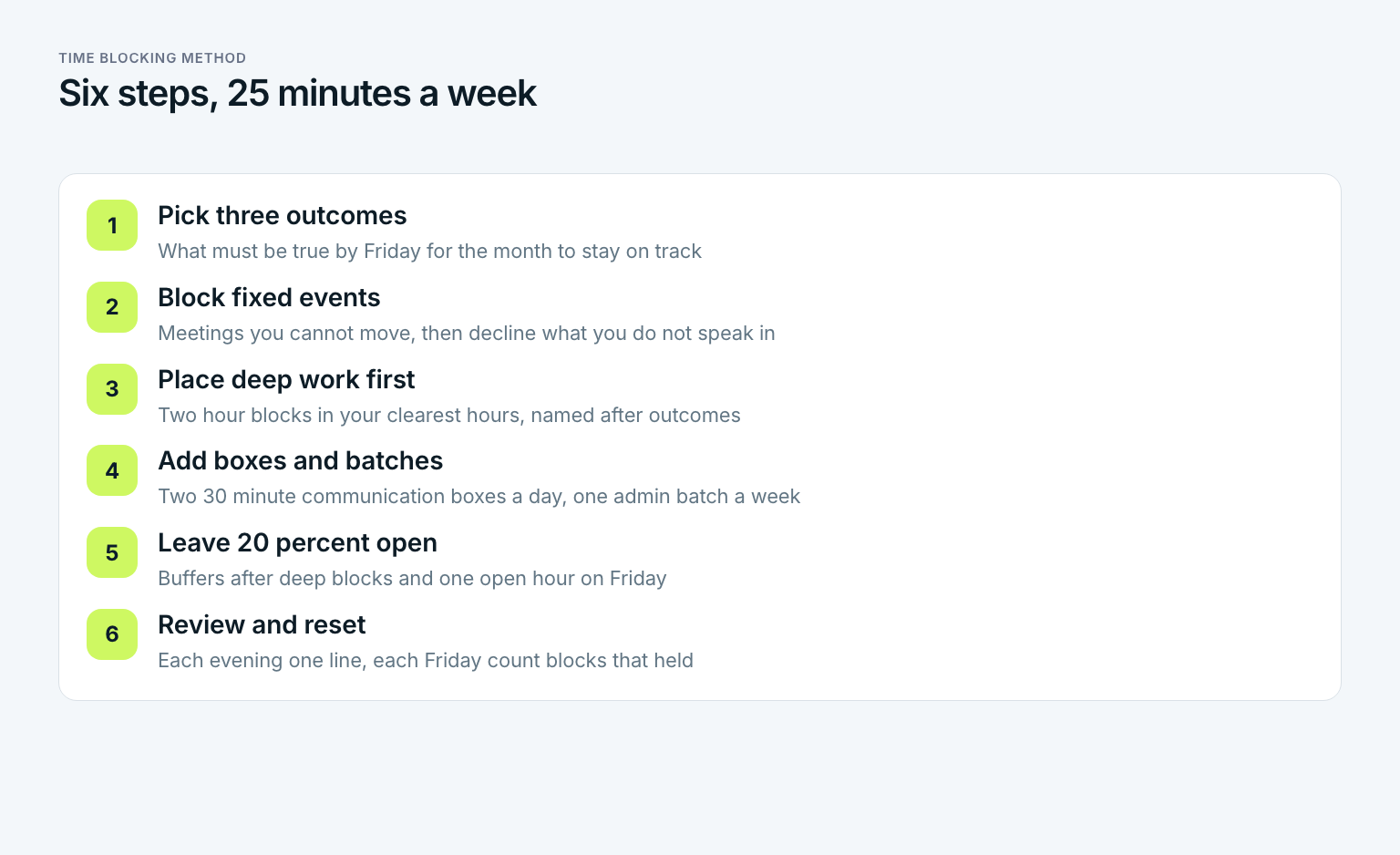
Whoever skips step one blocks their calendar with activities instead of outcomes, and a calendar full of activities is just a prettier to-do list. Whoever skips step five builds a plan that dies on Tuesday at 10:15, when the first thing runs over. Both steps feel optional and neither is.
Marcus's blocked week: the worked example
Here is week 41 as Marcus planned it on Friday afternoon of week 40. Deep work blocks are two hours and sit in the morning, where his energy is. Wednesday is his meeting day. Communication lives in two 30 minute boxes a day. Every block carries the outcome it serves.
| Day | Morning | Midday | Afternoon |
|---|---|---|---|
| Monday | 9:00 to 11:00 deep: screens 3 and 4 | 11:00 to 11:30 Slack and email box, 11:30 to 12:00 buffer | 13:00 to 14:00 design critique, 14:00 to 15:00 review for the growth team, 16:30 to 17:00 box |
| Tuesday | 9:00 to 11:00 deep: screen 5 | 11:00 to 11:30 box, 11:30 to 12:00 buffer | 13:30 to 15:00 usability test prep, 16:30 to 17:00 box |
| Wednesday | 9:00 to 12:00 meetings, three moved here | 12:30 to 13:00 box | 13:00 to 16:00 meetings and one on ones, 16:00 to 17:00 admin batch |
| Thursday | 9:00 to 11:00 deep: screen 6 and revisions | 11:00 to 11:30 box, 11:30 to 12:00 buffer | 13:00 to 15:00 usability tests, five users at 20 minutes, 16:30 to 17:00 box |
| Friday | 9:00 to 10:30 deep: test synthesis and handoff draft | 10:30 to 11:00 buffer, 11:00 to 11:30 box | 13:00 to 14:00 review for the data team, 14:00 to 15:00 open hour, 15:00 to 15:10 weekly review |
The numbers at the end of week 41: four deep blocks of two hours plus one of 90 minutes, 9.5 hours of design in five pieces instead of seven hours in eleven. Meetings fell from 14.5 to 11 hours. Slack and email fell from nine hours to five. Screens three to six were finalized, which brings him to six of nine, and the usability test ran with all five users. Two of the three outcomes landed in full, the handoff document is one page in. Nobody complained about the two declined meetings.
Not every block held. Monday's deep block lost 40 minutes to a production issue that needed a design decision. The rule from step six kicked in: screen 4 moved to Tuesday's block, Tuesday's screen 5 moved into the Thursday block, and the Friday open hour absorbed the rest. The plan bent and did not break. That is the point of the 20 percent.
Does this only work for designers with flexible mornings? No. Anyone who has at least six hours a week they can decide about can run the method at smaller scale: two deep blocks instead of five, one communication box instead of two. The structure is the same. Only the numbers shrink.
Time blocking in your goal chain: year, quarter, month, week, day
A block is only as good as the goal written next to it. That is why the method begins with outcomes and not with the calendar. Each block in Marcus's week can be traced upward through a chain of five levels, and the chain is what tells him whether a block deserves its two hours.
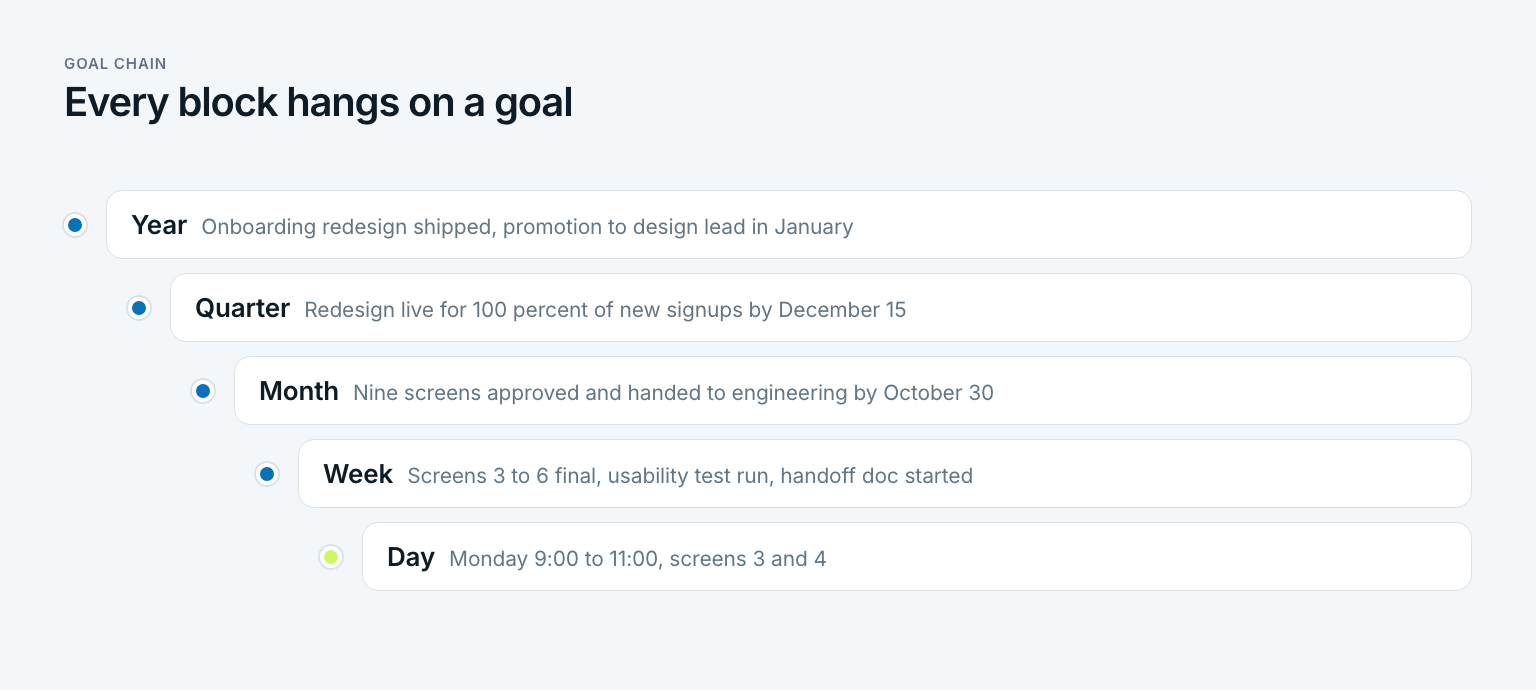
- Year: onboarding redesign shipped to all new users, promotion to design lead at the January review.
- Quarter: redesign live for 100 percent of new signups by December 15, with activation measured against the old flow.
- Month, October: nine screens approved and handed to engineering by October 30.
- Week 41: screens three to six final, usability test with five users run, handoff document started.
- Day, Monday: 9:00 to 11:00, screens three and four.
Read the chain downward and every block has a reason. Read it upward and every block has a test: if Monday's two hours do not move screen 3, they do not move the year. Marcus checks the test in two places. Each evening he marks which block moved its outcome. Each Friday he counts outcomes against the monthly goal and time against the month. At the end of week 41, 45 percent of October is gone and six of nine screens are done, 67 percent. For the first time the progress number is ahead of the time number.
Whoever plans only at the day level builds beautiful days that add up to nothing in particular. Whoever plans only at the year level has a goal and no Monday. The chain is what connects the two, and time blocking is the step where the chain finally touches the calendar. How to build the upper levels, from a yearly goal down to quarters and months, is the subject of the guide on how to achieve goals. The daily level, one outcome per day small enough to finish, is covered under daily goals.
In Gaapp this chain is the core of the product: five levels from year to day, each goal attached to a larger one. The weekly view shows your three outcomes next to the share of the week that has passed, so the Friday count in step six takes a glance instead of a spreadsheet.
Is time blocking actually effective? What the evidence says
Yes, with a condition. The effect comes from three mechanisms that are well studied, and all three fail when blocks are too many or too vague.
- Implementation intentions. Peter Gollwitzer showed in a 1999 review that people who decide in advance when and where they will act on a goal follow through far more often than people who only decide what. A time block is exactly that: an if-then plan with a time stamp.
- Reduced switching cost. The 23 minute recovery time from Mark, Gudith and Klocke's 2008 study means that every interruption costs more than its own length. Fewer, longer blocks mean fewer returns. Marcus went from ten returns a week to four.
- Closed loops. Bluma Zeigarnik observed in 1927 that unfinished tasks stay active in memory. Roy Baumeister and E. J. Masicampo found in 2011 that simply making a specific plan for an unfinished task quiets that effect. A block in the calendar is such a plan. The task stops nagging because it has a home.
Now the condition. Time blocking fails in two predictable ways. It fails when every hour is blocked, because the first overrun breaks the chain and the whole day collapses. And it fails when blocks are named after projects instead of outcomes, because a block called Onboarding has no finish line and quietly becomes browsing Figma. Anyone who has tried the method and quit after a week almost always hit one of these two.
That means: the question is not whether time blocking works. The question is whether your version has buffers and outcomes. If it has both, the research says it works. If it has neither, no amount of color coding will save it.
Time blocking for ADHD: where it helps and where it hurts
Time blocking is often recommended for ADHD, and for good reasons. It moves the plan out of the head and onto a screen. It replaces the open question of what to do next with a visible answer. And it puts edges around time, which helps with the common experience that an hour feels like ten minutes or like three hours. Several clinicians and coaches recommend external structure of this kind, and the method is one form of it. A plan is not a treatment, but it is a tool many people with ADHD describe as the first one that stuck.
The same method also hurts in a specific way. A rigid schedule that gets missed at 9:40 can turn into an all or nothing judgment about the day. So the ADHD version of the method changes four numbers and one rule:
- Shorter blocks. 25 to 45 minutes instead of two hours, with a visible timer. Several short blocks on one outcome beat one long block that feels like a wall.
- More buffer. 30 percent open instead of 20. Transitions take longer than planned, and the plan should know that.
- One outcome per day marked as the anchor. If only that block holds, the day counts as a win.
- A reset rule, written down. If a block is missed, the next block starts at the next round half hour. No catching up, no stretching, no judgment. The plan resumes.
Whoever builds the method this way gets the structure without the trap. The rest of the steps stay the same, including the Friday count. If anything, the evening review matters more, because it is where the week's wins become visible instead of the week's misses.
The three mistakes nobody notices
Most time blocking attempts do not fail loudly. They fail by Thursday of the second week, quietly, through one of three mistakes that each feel reasonable in the moment. Which one is yours?
The most common mistake: a calendar with no white space
Blocking 100 percent of the week feels thorough and lasts about two days. The first overrun pushes the next block, which pushes the next, and by 14:00 the plan describes a day that never happened. Fix: 20 percent of your working hours stay unblocked, as 30 minute buffers after deep blocks and one open hour on Friday. Overruns land in the buffers. The deep blocks survive.
- Blocks named after projects. Onboarding, Website, Q4 Planning. Each is a label, not a finish line. Rename every block after the outcome it should produce: Screen 3 final, Pricing page copy to review, Q4 budget draft to Sam. A block you can tick off is a block you will protect.
- Estimating in hope instead of in history. Marcus thought a screen took an hour. His week 40 data said closer to two and a half, including revisions. Whoever blocks on hope gets a plan that is 40 percent too short every single week and concludes the method does not work. Track two weeks, then block on the numbers.
- Treating a missed block as a failed day. One lost block is a scheduling event, not a verdict. Move the work to the next block or to the Friday open hour, write one line about why it moved, and continue. Three misses of the same block in a row is information for the Friday review. One miss is Tuesday.
None of the three is a character flaw. They are design flaws in the plan, and all three are fixed in the plan, not in you.
A free time blocking template, on paper or in your calendar
The time blocking template below is one week, five days, four rows per day. Copy it into a spreadsheet, a notes app, or straight into your calendar as recurring events. The third column shows what Marcus wrote for Monday of week 41, so you can see how short an entry may be.
| Row | What goes here | Marcus, Monday of week 41 |
|---|---|---|
| Weekly outcomes | The three things that must be true by Friday | Screens 3 to 6 final, usability test run, handoff doc started |
| Deep block 1 | Two hours, morning, one outcome | 9:00 to 11:00, screens 3 and 4 |
| Communication box 1 | 30 minutes, end of morning | 11:00 to 11:30, Slack and email |
| Buffer | 30 minutes, unnamed | 11:30 to 12:00 |
| Fixed events | Meetings and commitments you did not choose | 13:00 to 14:00 design critique |
| Deep block 2 or batch | Second outcome, or admin batch | 14:00 to 15:00, review for the growth team, boxed |
| Communication box 2 | 30 minutes, end of afternoon | 16:30 to 17:00 |
| Evening note | One line: what moved, what moved where | Screen 3 done, screen 4 to Tuesday, production issue took 40 min |
Three rules for filling it in. Deep blocks go in before fixed events are negotiated, not after, because what is in the calendar first tends to stay. Every block gets an outcome in its title, not a project name. And the evening note is one line, written in under a minute, because the Friday review needs five of them and nothing more. Whoever wants the upper levels of the chain ready made, from yearly goal to weekly outcomes, finds goal packages under templates. Each goal in them can be renamed or deleted.
Color coding and tools
Color coding helps exactly as much as it reduces decisions and no more. Three colors are plenty: one for deep work, one for communication and admin, one for fixed events. The tool matters less than people hope. Google Calendar, Outlook, a paper planner, or a printed sheet on the desk all hold a block equally well. What breaks the method is never the tool. It is a block without an outcome or a week without white space.
Three questions before you block next week
Before you open the calendar on Friday, answer these three about the week that just ended. They take two minutes and they decide whether next week's plan is built on numbers or on mood.
- How many deep blocks did you plan, and how many held for their full length? Write both numbers.
- Which of the three outcomes landed, and which block was supposed to produce the one that did not?
- How many hours did you spend on work that serves no goal on your chain, and which block was it hiding in?
Whoever answers the first question with two numbers that are far apart has a buffer problem, not a discipline problem. Whoever cannot name the block behind a missed outcome has a naming problem. Whoever finds four hours hiding in no goal has a step one problem, and the fix is to keep three goals and let the rest go. The ten minute weekly review is where these three answers turn into next week's three outcomes.
In short: time blocking is not a way to fit more into your week. It is a way to make sure the week you already have lands on the goals you already chose.
Frequently asked questions about time blocking
Is time blocking good for ADHD?
For many people it is, because it moves the plan out of the head and gives time visible edges. The version that works uses shorter blocks of 25 to 45 minutes, about 30 percent open buffer, one anchor outcome per day, and a written reset rule for missed blocks. A rigid, fully booked calendar tends to backfire. A plan is a tool, not a treatment, so it sits next to whatever else helps you, not in place of it.
Is time blocking actually effective?
Yes, when blocks carry outcomes and the week keeps about 20 percent open. The method works through three well studied mechanisms: implementation intentions, fewer task switches, and closing open loops by giving tasks a scheduled home. It fails when every hour is booked or when blocks are named after projects instead of results. In Marcus's week, the same seven to nine hours of design produced four finished screens instead of two.
What do you mean by time blocking?
Time blocking means dividing your day into named blocks of time, each reserved for one kind of work, and writing those blocks into your calendar before other people fill it. A block has a start, an end, and an outcome it should produce. It is a to-do list with a when attached, and the when is what makes it hold.
Does Elon Musk time block?
He has said in interviews that he plans his day in five minute slots, and that claim is widely repeated in productivity articles. Whether it is literally true on a given day is impossible to verify from the outside. The useful lesson is not the five minutes. It is that people with extreme demands on their time decide in advance where it goes. Two hour blocks and 30 minute boxes do the same job for the rest of us.
What is the difference between time blocking and timeboxing?
A time block reserves a slot for a kind of work and lets the work decide when it is done. A timebox sets a hard maximum and stops when the box ends, finished or not. Use blocks for deep work that rarely ends on the bell, and boxes for tasks that expand if you let them, such as email, reviews, and meeting prep. Most good weeks mix both.
How many hours a day should I time block?
Block your deep work and your communication, then leave about 20 percent of your working hours open on purpose. For an eight hour day that is roughly two deep hours, one hour of communication in two boxes, your fixed meetings, and about 90 minutes of buffer spread through the day. Anyone with a heavier meeting load blocks fewer deep hours, not fewer buffers.
Last updated: 19 October 2026
Read next
 Productivity
Feynman Technique: Four Steps to Real Understanding
The Feynman technique is not a memorization trick: four steps, a worked example from a stats class, a one-page template, and what research says.
16 min read
 Productivity
Zettelkasten: How to Turn Notes Into Your Own Ideas
A Zettelkasten is not an archive: Luhmann's method, the three note types, a five-step setup and an Obsidian template, with a worked example.
15 min read
 Productivity
Second Brain: How to Build One You Actually Use
A second brain is not a note archive: Tiago Forte's CODE steps, the PARA method with an example, a five-step setup and the mistakes that sink it.
15 min read