Best To-Do List App: How to Choose the Right One
The best to-do list app is not the one with the most features. Seven apps compared by criteria, with a table, a decision guide, and a worked example.

Contents
- 01What a to-do list app does and what it cannot do
- 02Seven criteria for choosing a task planner
- 03The best to-do list app for each situation: seven apps compared
- 04How to choose a to-do app in five questions
- 05The best free to-do list app: what free actually covers
- 06The three mistakes nobody notices when switching apps
- 07Priya decides: a two-week trial instead of two years of switching
- 08Where a goal app works differently from a to-do app
- 09Three questions before you install another app
- 10Frequently asked questions about to-do list apps
The best to-do list app is not the one with the longest feature list. It is the one that fits your devices, your email, and the people you share lists with, and that you still open every morning a month from now. A to-do app stores tasks, reminds you of them, and lets you check them off. It does not decide what matters today. That part stays with you, whichever app you pick.
Below, seven widely used apps sit side by side: Todoist, Microsoft To Do, TickTick, Things 3, Apple Reminders, Google Tasks, and Notion. You get seven criteria, a comparison table, a five-question decision guide, and one worked example: Priya, a product marketer who tried three apps in two years and fixed the problem by changing how she chose, not what she chose. Pricing and features are described as of October 2026. Both change often, so check the vendor's own page before you switch.
What a to-do list app does and what it cannot do
A to-do list app is software on your phone, computer, or browser where you capture tasks, sort them, and check them off. Every app in this category does three things: it takes input faster than paper, it reminds you at a date or time, and it shows you what is due today. Everything else is equipment. Projects, tags, filters, calendar views, shared lists, focus timers. Some of that equipment earns its place. A lot of it just makes collecting more comfortable.
To-do apps are built for capture, and most of them capture very well. What no app does is the choosing: which six of your 80 open tasks belong on tomorrow? You make that call, not the software. How to write a list that is empty by evening is covered in the guide to the to-do list. This article is about the tool that list lives in.
Anyone who looks for an app that makes the decisions will be disappointed within three weeks and install the next one. Anyone who looks for an app that records decisions quickly will find a good fit among the seven below. That means: your expectation shapes the outcome more than your pick does.
Seven criteria for choosing a task planner
Seven criteria are enough to cut any list of the best to-do apps down to two or three real candidates. The first three are filters. The last four are trade-offs, where there is no right answer, only a fitting one.
- Devices. Which devices do you need the list on, and which devices do the people you share it with use? An Android phone rules out apps that only exist for Apple. It is the fastest question and the one people skip most.
- Home base. Do you live in Outlook, Gmail, or iCloud? An app that sits next to your email and calendar saves you from retyping tasks every day.
- Sharing. Do you need lists that someone else edits too, such as groceries with a partner or tasks with a team? Not every app shares, and some only share between users of the same platform.
- Capture speed. How fast does a task get into the app when you are out? Time it once: unlock the phone, open the app, type a task with a date. If that takes longer than 15 seconds, tasks will drift back onto sticky notes.
- Structure. Is one list for today and one for later enough, or do you need projects, areas, and filters? More structure means more upkeep. Whoever skips the upkeep ends up with a beautifully sorted archive that nobody opens.
- Calendar. Does the app show tasks and appointments together? That helps if you plan your day in blocks. Without a calendar, a list of six tasks always looks doable, even on a day with five hours of meetings.
- Cost model. Free, free with a paid tier, subscription, or one-time purchase. Count the move as well as the price. A list with 200 items does not migrate in ten minutes.
What about goals? They are missing from this list on purpose, because classic to-do apps are not built around them. They know projects and due dates, but no layer above that says why a task exists. The section on the goal chain comes back to that. In short: run the three filters first, weigh the four trade-offs second, and read feature lists last.
The criteria in practice: Priya and her 212 open items
Priya is 31 and a product marketing manager at a software company in Denver. At work she uses a company MacBook with Gmail and Google Calendar, and IT only allows approved apps on it. Her personal phone is an iPhone, and so is her partner Sam's. She is also training for her first half marathon. In two years she has tried three tools: the Notes app, then two task apps. Between them they hold 212 open items, 74 of them older than three months.
| Criterion | Priya's answer | What it means for the choice |
|---|---|---|
| Devices | iPhone, work MacBook, Sam on iPhone | All seven apps still qualify |
| Home base | Gmail and Google Calendar at work | Google Tasks sits closest to her email |
| Sharing | Groceries and chores with Sam | Shared lists between two iPhones |
| Capture speed | Ideas arrive between meetings | Under 15 seconds on the phone |
| Structure | Six launch projects at work, two personal | Projects and filters are worth it |
| Calendar | Meetings live in Google Calendar | No second calendar inside the app |
| Cost | Fine to pay if it earns its place | Paid tier or one-time purchase allowed |
Seven questions, seven rows, ten minutes. The answers split her needs in two. The household stays in Apple Reminders, which Sam and she already share for free. For work and training, six parallel projects call for a structured planner, and her shortlist is Todoist and Things 3. TickTick drops out because she does not want a second calendar next to Google Calendar, Notion because she has no time to build a system. That is a verdict on her week, not on those apps.
The best to-do list app for each situation: seven apps compared
The table describes each app by what sets it apart and the situation it is built for. It is not a ranking. A single winner would assume everyone needs the same thing, and they do not. Prices appear only as a cost model, as of October 2026.
| App | Platforms | Cost model | Strength | Fits if you |
|---|---|---|---|---|
| Todoist | Web, Windows, Mac, iOS, Android | free, with a paid tier that adds more | fast capture by typing a sentence, projects, filters, priorities | run many projects across many devices |
| Microsoft To Do | Web, Windows, Mac, iOS, Android | free with a Microsoft account | My Day view, flagged Outlook emails become tasks | work in Outlook |
| TickTick | Web, Windows, Mac, iOS, Android | free, with a paid tier for more features | tasks, calendar, focus timer, and habits in one app | want everything in one place |
| Things 3 | Apple only: Mac, iPhone, iPad, Watch | paid, one-time purchase, no subscription | calm design, clear split of areas and projects | use only Apple and plan alone |
| Apple Reminders | iPhone, iPad, Mac, iCloud on the web | free, preinstalled | Siri, shared lists, location reminders | share lists in an Apple household |
| Google Tasks | Web inside Gmail and Calendar, iOS, Android | free with a Google account | lives next to Gmail and Google Calendar | work in Google and need little structure |
| Notion | Web, Windows, Mac, iOS, Android | free for individuals, paid plans | tasks as a database you build, linked to notes | want tasks tied to notes and like to build |
Todoist
Todoist is a cross-platform task app with projects, sections, labels, filters, and four priority levels. Its strength is input. You type a sentence with a date in it, and the app picks up the due date and the repeat pattern. The free version covers a lot for one person, and the paid tier expands it. Anyone who juggles several projects and likes structure settles in quickly. Anyone who only needs a grocery list uses a fraction of it.
Microsoft To Do
Microsoft To Do is Microsoft's task app and the successor to Wunderlist. Its core is the My Day view, which starts empty every morning so you choose on purpose what goes on today. If you work in Outlook, emails you flag show up as tasks. Lists can be shared with other Microsoft accounts. The structure is flatter than Todoist's, and for many people that flatness is the point.
TickTick
TickTick combines task lists with a calendar view, a focus timer based on the Pomodoro Technique, and a habit tracker. The free version covers the basics, and some views and extras sit behind the paid tier. Whoever wants tasks, appointments, focus sessions, and habits inside one app gets a lot under one roof here. Whoever already has a calendar and a timer gets extra menus for things they own twice.
Things 3
Things 3 by Cultured Code exists only for Apple devices: Mac, iPhone, iPad, and Apple Watch. It is a one-time purchase, with no subscription. It separates ongoing areas such as work and family from projects that end, and many users describe its design as calm. Shared editing of lists is not what it is for. Anyone who plans alone and uses only Apple gets a very well thought-out app. Anyone who shares groceries with an Android partner needs a second app next to it.
Apple Reminders
Apple Reminders comes preinstalled on iPhone, iPad, and Mac, and it is free. It shares lists with other Apple users, takes tasks by Siri, and can remind you at a place, for example when you leave the office. For a household of iPhones it is often the obvious choice, because nobody has to install anything. It is not built for large projects with many layers, and it does not try to be.
Google Tasks
Google Tasks is the plain task list inside your Google account, free, with apps for iOS and Android. On a computer it sits in the side panel of Gmail and Google Calendar, and one click turns an email into a task. It has lists, subtasks, due dates, and repeats, and not much more. That is not a gap. It is the design. Whoever works in Google and needs little structure gets the list with the shortest path.
Notion
Notion is not a to-do app in the narrow sense. It is a workspace made of pages and databases. You build a task list yourself, as a table, a board, or a calendar, and link it to notes, projects, and documents. The freedom has a cost. Setup takes time, and capturing a task on the go takes more steps than in a pure list app. Whoever enjoys building will be happy here. Whoever needs a list tonight probably will not.
Four kinds of apps instead of seven names
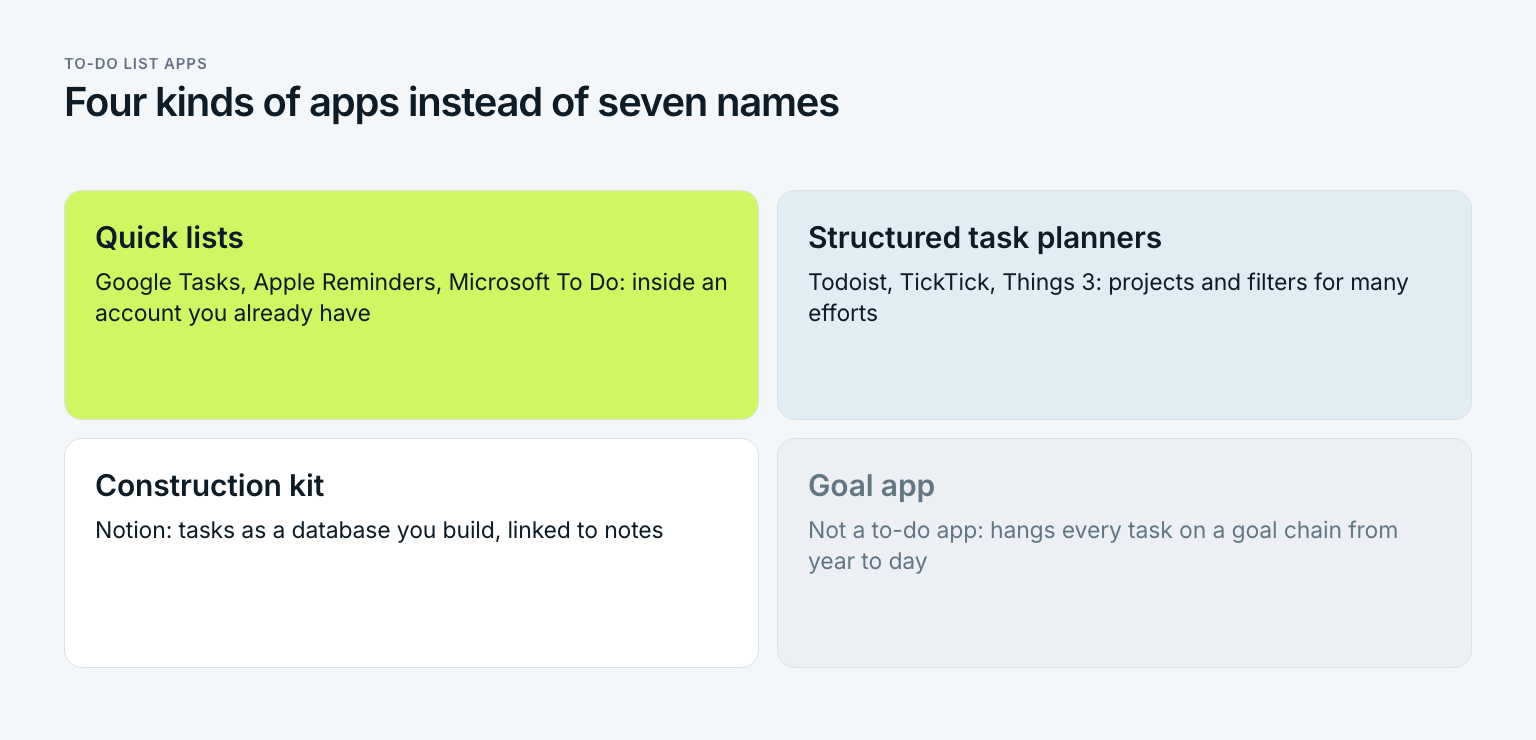
Sort the seven by how they are built and four kinds remain. Quick lists such as Google Tasks, Apple Reminders, and Microsoft To Do live in an account you already have. Structured task planners such as Todoist, TickTick, and Things 3 offer projects and filters. Notion is a construction kit. The fourth kind is not a to-do app at all, but a goal app that hangs every task on a goal above it. Anyone who picks the kind first compares two apps instead of seven.
How to choose a to-do app in five questions
The decision guide works like a sieve. Each question removes apps until two are left. A one-week trial of each settles the last two, not another review.
Check devices and who you share with
If everyone involved uses Apple, all seven apps stay in. If an Android phone is part of the picture, Things 3 and Apple Reminders drop out. If you share with someone on another platform, keep the apps that run everywhere.
Look at where your email and calendar live
Outlook points to Microsoft To Do, Gmail and Google Calendar point to Google Tasks, iCloud points to Apple Reminders. None of that is a rule. But every copy and paste between tools costs you a few minutes a day.
Count your projects
Up to three active projects, a flat list with a today view is enough. From five upward, projects and filters like those in Todoist, TickTick, or Things 3 start to pay off. If you want tasks linked to notes and documents, Notion is the kit for that.
Set the cost model before you test
The apps from the big platforms are free with no paid tier. Todoist, TickTick, and Notion are free with a paid tier, and Things 3 is a one-time purchase. Decide what you are willing to spend before the trial, not after you have grown used to a paid feature.
Trial two candidates for one week each
Use each of the last two apps for everything, for a full week. At the end, count two things: on how many mornings did you open the app, and how many tasks still ended up on paper? The numbers decide, not the feeling from day one.
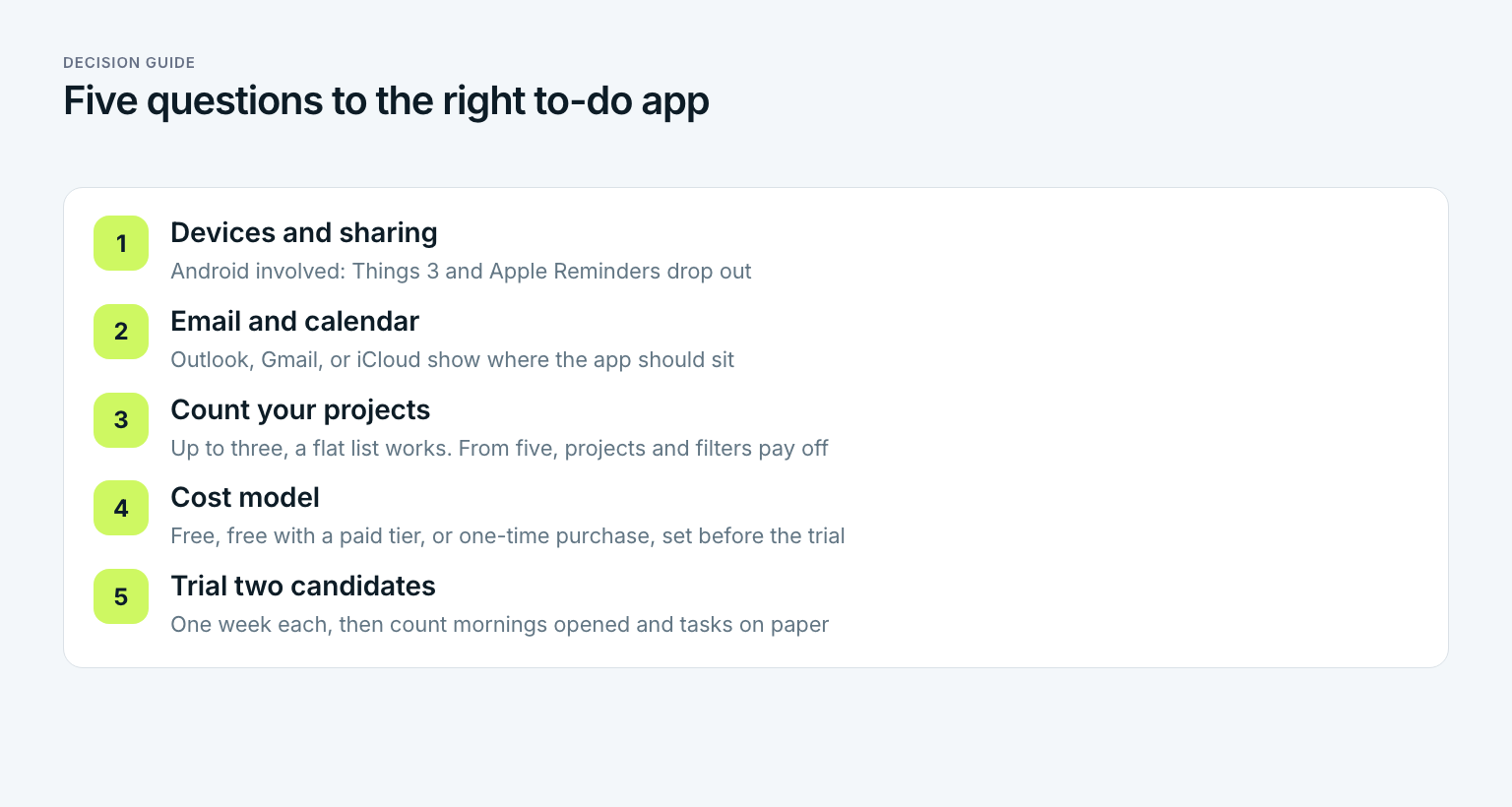
The five questions boil down to rules of thumb. Anyone who works in Microsoft tools starts with Microsoft To Do. Anyone who runs their life in a Google account and needs little structure takes Google Tasks. Anyone who uses only Apple and plans alone trials Things 3 against Apple Reminders. Anyone who runs many projects across many devices compares Todoist and TickTick. Anyone who wants tasks tied to notes and enjoys building tries Notion.
And anyone who wants to know whether their tasks move them toward a goal? They need something none of these apps is at its core. In short: the decision guide finds the right to-do app, but it does not tell you why the tasks inside it are there.
The best free to-do list app: what free actually covers
Free means two different things with to-do apps. Microsoft To Do, Google Tasks, and Apple Reminders have no paid tier at all, because they make the vendor's account more useful. Todoist, TickTick, and Notion are free to use and pay their bills with a paid tier that adds capacity or features. Paper, by the way, is free too, and for someone who works alone at one desk, a card with six lines can be the most honest to-do app there is.
For your choice, that means: whoever starts on an app with a paid tier should check first which feature they would miss in three months. Reminders, calendar views, and the number of projects are typical lines between tiers, and exactly where those lines sit keeps moving. Anyone who gets used to a paid feature during a trial and then loses it often stops using the app altogether. That means: test the free version the way you would use it for good.
The three mistakes nobody notices when switching apps
Switches usually fail because of habits that move along with the tasks. Three of them are so common that they sit inside almost every list that is full again after a month.
The most common mistake: moving the whole old list
Anyone who imports their old list in full brings the problem along. The new app feels lighter for two weeks, and then it is as full as the old one. Clean up before you move. Anything older than three months gets cut or goes on a someday list. Only tasks with a date in the next two weeks move into the new app. That is the difference between a fresh start and a change of address.
The second mistake is choosing by features instead of by your week. Roundups reward apps that do a lot. A calendar, a timer, and a habit tracker in one app are a real plus for people who use all three. For everyone else they are menu items to tap past. Whoever chooses by their week asks what they will do with the app on an ordinary Tuesday.
The third mistake is too many inboxes. Notes app, sticky notes, emails to yourself, and a task app, all at once. David Allen argues in Getting Things Done, published in 2001, that a system only works if you trust it: everything lands in one place, and that place gets reviewed on a schedule. The method itself is laid out in the guide to Getting Things Done. For choosing an app, one rule is enough. One inbox, not four. That means: the new app replaces the old places, it does not join them.
Priya decides: a two-week trial instead of two years of switching
Priya has two candidates for work and training: Todoist and Things 3. The household stays in Apple Reminders, which she and Sam already share.
| What happens to Priya's 212 old items | Count | Where they go |
|---|---|---|
| Tasks with a date in the next two weeks | 38 | into the new app |
| Done, outdated, or no longer hers | 71 | cut |
| Ideas and someday tasks with no date | 103 | a someday list in Notes |
| Total | 212 | 38 tasks move, less than a fifth of the old list |
Less than a fifth. That is how much of the old list was ever meant for the next two weeks. How many items on your list have a date in the next fourteen days?
Then the trial. In week one with Things 3, she opens the Today view on all five workdays at home, but her work MacBook only runs approved software, so at the office she reads tasks off her phone. In week two with Todoist, she uses the web version on the work laptop and catches tasks between meetings without picking up her phone. The deciding factor is the browser on the work machine, not a feature. For someone with a personal Mac at work, the choice could easily go the other way.
After four weeks, her daily list is empty by evening on 15 of 20 workdays. The new app is not the reason. The reason is that she now only adds what is due in the next two weeks. One thing does stand out, though. Her training runs show up in the new app as rarely as they did in the old one. They are never urgent, so something else always wins. That is not a flaw in the app. It is the problem a to-do app was never built to solve.
Where a goal app works differently from a to-do app
A goal app is not a better to-do app. It is built for a different question. The to-do app answers: what is due today? The goal app answers: does what is due today move me toward my goal? Both questions are fair, and most people need both answers.
Priya has a goal for 2027: finish the spring half marathon in April in under two hours. In her task app, that goal shows up only as a single item like "run 4 miles". There it competes with launch deadlines and a dentist appointment, and it usually loses, because it is never urgent. The goal chain translates the yearly goal into a year, a quarter, a month, a week, and a day, until it is small enough for a Tuesday morning.
| Level | Priya's goal | Where it lives |
|---|---|---|
| Year 2027 | Spring half marathon in April finished in under two hours | Goal app |
| Q1 | Weekly mileage built up to 20 miles, one 10-mile long run done | Goal app |
| January | Three runs every week, long run up to 7 miles | Goal app |
| Week 3 | Three runs, 14 miles in total | Goal app |
| Tuesday | Easy 4-mile run, 6:30 a.m., 40 minutes | Goal app and the Today list in the task app |
The goal chain only meets the to-do list at the bottom level. There, the Tuesday run sits next to the launch tasks, but with one difference. Priya knows it hangs on a weekly goal, and the weekly goal hangs on the quarter. How to write weekly goals that hold until Friday is covered in the guide to weekly goals. When and in what order the day's tasks happen is a matter of planning your day.
Gaapp is built for exactly this chain. It is not a classic to-do app, but a goal app: every goal hangs on a goal above it, from year to day, and for each period you see how far along you are. Priya keeps her grocery list with Sam in Apple Reminders, and that is the right call. The goal app does not replace the grocery list. It gives the important tasks a reason to rise to the top.
Anyone who wants both questions answered has two paths. The first is two tools with a clear border: the goal app holds the chain from year to week, the to-do app holds everyday life, and on Sunday evening the week's daily steps move over as tasks. The second is one tool for goals and daily tasks, usually with less comfort for grocery lists. Priya picked the first, because her work tasks need to live in the browser at the office. Whoever keeps few everyday lists can take the second path and run on Gaapp alone.
Three questions before you install another app
Before you read the next roundup, answer three questions in writing. They take five minutes, and at best they save you a move.
- Did your last app fail, or did your list fail? If the old app was overflowing, the new one will overflow too. Then cleaning up helps more than switching.
- Has one of the three filters changed? New devices, a new employer with a different email system, someone you now share lists with: those are good reasons to switch. A new feature in a review is not.
- Do you know why the tasks on your list are there? If not, no to-do app solves the problem. A layer above the list is missing, and you will not find it in any settings menu.
Whoever answers the first question with "the list" cleans up first. Whoever finds a yes in the second goes through the five-question guide. Whoever hesitates at the third needs goals first and an app second. The best to-do list app is not the one that does the most. It is the one you still open every morning four weeks from now.
Frequently asked questions about to-do list apps
What is the best to-do list app?
There is no single best app for everyone, only the best fit for your week. If you work in Outlook, start with Microsoft To Do. If you live in Google, start with Google Tasks. If you only use Apple, trial Things 3 against Apple Reminders. For many projects across many devices, compare Todoist and TickTick, and for tasks tied to notes, try Notion.
What is the best free to-do list app?
As of October 2026, Microsoft To Do, Google Tasks, and Apple Reminders are free with no paid tier at all. Todoist, TickTick, and Notion are free to use and also offer a paid tier with more capacity or features. The best free one is the one that sits closest to the email and devices you already use. Check the vendor's page for what the free tier currently includes.
Is Todoist better than TickTick?
Neither is better across the board, because they are built for slightly different needs. Todoist focuses on fast capture, projects, and filters. TickTick adds a calendar view, a focus timer, and a habit tracker inside the same app. If you already have a calendar and a timer you like, Todoist keeps things leaner. If you want all of it in one place, TickTick fits better.
What is the best to-do list app for iPhone?
For most iPhone users the first candidate is Apple Reminders, because it is free, preinstalled, and shares lists with other Apple users. If you plan alone and want more structure, Things 3 is a one-time purchase built only for Apple devices. If you also use Windows or share with someone on Android, a cross-platform app like Todoist, TickTick, or Microsoft To Do is the safer choice.
Can I share a to-do list with my partner?
Yes, most apps in this comparison share lists, but not all of them across platforms. Apple Reminders shares between Apple users, Microsoft To Do between Microsoft accounts, and Todoist and TickTick through their own accounts on all major platforms. Things 3 is built for one person. Check which phone your partner uses before you choose.
Is a to-do list app better than paper?
Paper is enough if you work at one desk, have few appointments, and share nothing. An app pays off as soon as you capture on the go, need reminders at a set time, or share lists with others. Many people use both: the full list in an app and today's tasks on a card.
Last updated: 6 October 2026
Read next
 Planning
Cleaning Schedule: Daily, Weekly and Monthly Tasks
A cleaning schedule is not a Saturday to-do list: daily, weekly and monthly tasks, a printable template and a fair split for families.
15 min read
 Planning
Study Plan: How to Make One You Can Actually Follow
A study plan is not a schedule. Make one in six steps: inventory, hours math, buffer, a sample study schedule and a template, with a worked example.
17 min read
 Planning
Bullet Journal: How to Start One You'll Actually Keep
A bullet journal is not an art project. Learn the bullets, four core modules, migration and a six-step setup, with an example, 12 ideas and a goal chain.
15 min read