Digital Planner: How to Set One Up You'll Actually Use
A digital planner is not a pretty PDF. Compare hyperlinked tablet planners, apps and calendar hybrids, then set yours up in six steps.
Contents
- 01What is a digital planner? Three formats compared
- 02How a digital planner is structured: year, month, week, day
- 03Digital planner vs. paper: the honest trade-offs
- 04What really happens to most digital planners
- 05How to set up a digital planner in six steps
- 06Digital planner app, tablet, or calendar: which one fits you
- 07Priya's first month with a digital planner
- 08Your digital planner in the goal chain: from yearly goal to Thursday
- 09The three mistakes nobody notices
- 10Frequently asked questions about digital planners
A digital planner is not a pretty PDF you buy once and admire. It is a planning system on a tablet, phone, or computer that connects your year, month, week, and day, so one tap takes you from a yearly goal to tonight. It comes in three formats: a hyperlinked PDF you write in with a stylus, a planner app, and a hybrid of your digital calendar and a planner. Design does not decide which one fits. Where your appointments live, and where your goals live, does.
A digital planner that survives past month three needs three things: few levels, few fields, and fixed times when you open it. Everything below is worked through with Priya, 29, an ICU nurse in Denver who works three 12-hour shifts a week on a rotating schedule and is studying for her critical care certification exam. After two years with a spiral paper planner, she moved to a tablet in October. Her numbers are in the tables, including the ones from her first attempt, which she abandoned after nine days.
What is a digital planner? Three formats compared
All three formats do the same basic job: they lead from the big picture down to today. They differ in how you write, how you move around, and who else gets to look. Each one is built for a different kind of week.
The hyperlinked PDF planner
The best-known digital planner is a PDF with a few hundred pages. Tabs along the edge jump to each month, every monthly page links to its weeks, and every weekly page links to its days. You open the file in a note-taking app that lets you write on PDFs with a stylus, such as GoodNotes or Notability, and tap through it like a book with bookmarks. It feels close to paper. The difference is that pages can be duplicated, entries can be moved, and a whole week can be copied in seconds.
Anyone who loves handwriting feels at home here fastest. The price is rigidity. When a shift gets swapped, nothing on the page moves by itself, and a PDF will never send you a reminder. In short: a hyperlinked planner is a better notebook, not an assistant.
The digital planner app
A digital planner app is software that sorts tasks, goals, and often appointments into lists and views. You type instead of write. In exchange you get what paper never offers: reminders, repeating items, search, and usually sync between phone and computer. Pure to-do list apps are their own category. They collect tasks without tying them to goals.
The app's strength is also its weakness. Because a new item costs nothing, the list grows faster than you finish it. Whoever runs a planner app without a limit has 80 open items after three weeks and no plan. That means: an app needs rules that a notebook enforces on its own, simply by running out of space.
The calendar hybrid
The third format is a division of labor. Anything with a time and other people goes in the digital calendar you already use. Goals, weekly planning, and the daily goal go in the planner, whether that is a PDF or an app. The calendar remembers commitments. The planner remembers intentions. Anyone who also blocks time in the calendar for their goals turns that calendar into a planner with a clock.
For shift workers, parents with a shared family calendar, and anyone with back-to-back client calls, the hybrid is usually the calmest setup. Nothing gets entered twice, and the planner only has to do what the calendar cannot.
| Format | How you write | Strong at | Weak at |
|---|---|---|---|
| Hyperlinked PDF planner | With a stylus, like paper | Handwriting, layout, seeing a whole week on one page | Schedule changes, reminders, sharing |
| Digital planner app | Typing, lists, views | Reminders, repeating tasks, search, phone and computer | Showing the shape of a week, limiting volume |
| Calendar hybrid | Appointments in the calendar, goals in the planner | Shift work, shared schedules, protected time blocks | Needs one clear rule about what goes where |
Hyperlinked planner
A hyperlinked planner is a PDF whose pages link to each other. Tap “March” and you land on the monthly page. Tap “Week 12” and you land on that week. The links turn 400 pages into a tool where any day is two taps away. Without them, a digital planner is just a very long document.
How a digital planner is structured: year, month, week, day
Every useful planner has four levels, whatever the format. The yearly page sets direction, the monthly page spreads it out, the weekly page makes it concrete, and the daily page decides what happens today. Skip one and you notice in March, when every week is full and the yearly goal has not moved.
| Level | What goes there | When you open it | Priya, October 2026 |
|---|---|---|---|
| Year | Three to five yearly goals with a number and a date, key deadlines | Once a quarter | Pass the certification exam by December 12, run a half marathon on November 8, pay off the last $2,400 of the car loan by December 31 |
| Month | Up to three monthly goals, fixed dates, available hours | Last weekend of the month, and mid-month | Review chapters 1 to 6 plus one practice test, twelve runs, $800 extra on the car loan |
| Week | Weekly goals, focus blocks, carry-overs from last week | First day off of the week, and the last | Chapters 3 and 4, three runs including 9 miles, $200 payment |
| Day | One daily goal, appointments, three small tasks | The evening before, briefly in the morning | Thursday: chapter 4, hemodynamics, 1 to 3 p.m. |
Look at the right-hand column. The deeper the level, the shorter the entry and the more exact the time. A yearly page can be broad. A daily page cannot. The weekly page is covered in the guide to weekly planning, and the daily page in the daily planner template.
One level is missing from most planners you can buy: the quarter. Between a year and a month sit about 13 weeks, and a yearly goal needs a visible checkpoint inside them. One line per yearly goal on the yearly page is enough, such as “Q4: exam passed.” In short: four levels carry the planner, and the quarter line keeps it honest.
Digital planner vs. paper: the honest trade-offs
Paper is a good tool. It never needs charging, and anyone who writes by hand tends to think more slowly and often more clearly. In experiments published in 2014, Pam Mueller and Daniel Oppenheimer found that students who took notes by hand answered conceptual questions better than students who typed. Later replications found a smaller gap. A stylus on a tablet is still handwriting, though, so the argument carries over to digital.
Where paper struggles is not writing. It is rewriting. Priya measured this for two years without meaning to. Every week, on her first day off, she copied her shifts into the planner, redrew the weekly layout, and moved over unfinished tasks. That took about 35 minutes before any real planning started.
| Criterion | Paper, Priya's spiral planner | Digital, Priya's tablet |
|---|---|---|
| Setting up the week | 35 minutes: copy shifts, draw the layout, move open tasks | One minute: duplicate the template, shifts are already in the calendar |
| A shift gets swapped | Cross out, rewrite, the page gets messy | Change it in the calendar, the planner stays clean |
| Finding a note from September | About ten minutes of flipping | Tabs or search, under a minute |
| Distraction | None | High if messages arrive on the same device |
| Reviewing the quarter | Three months of pages, hard to compare | Every week in one file, linked together |
The math is clear, if not on every line. Thirty-five minutes of setup a week adds up to about 30 hours a year. A digital planner removes nearly all of it, because the copying disappears. In exchange, a new opponent shows up: the device itself. A tablet also shows texts, videos, and email. Whoever plans on a device that buzzes needs a rule against it, such as turning on Do Not Disturb whenever the planner file is open.
In short: paper is built for thinking, and a digital planner is built for replanning. Anyone whose schedule rarely changes and who enjoys drawing loses nothing by staying on paper. Anyone whose shifts or meetings move every week wins back an evening a month.
What really happens to most digital planners
A digital planner rarely fails because of the technology. It fails because of the setup high. The first evenings go into covers, color palettes, and digital stickers, the file has more than a thousand pages, and after a week and a half nobody opens it. That is exactly how Priya's first attempt went in September.
She had downloaded a dated planner for the whole year: a yearly overview, twelve months, 52 weekly pages, 365 daily pages, plus habit trackers, budget pages, reading logs, and hundreds of note pages, close to 1,100 pages in all. She spent about five hours decorating it. In the end she used four page types: the monthly overview, one weekly page, one daily page, and a notes page for exam prep. On day nine, she stopped opening it.
Why do people quit when everything looks beautiful? Because a 1,100-page planner asks, every time you open it, which page is today's. Whoever turns a planner into a hobby ends up planning the planner instead of the week. That is not a character flaw. It is a design flaw.
That means: the second attempt does not start with a prettier file. It starts with fewer pages, one rule for appointments, and fixed times to open the planner. The six steps below are built for exactly that.
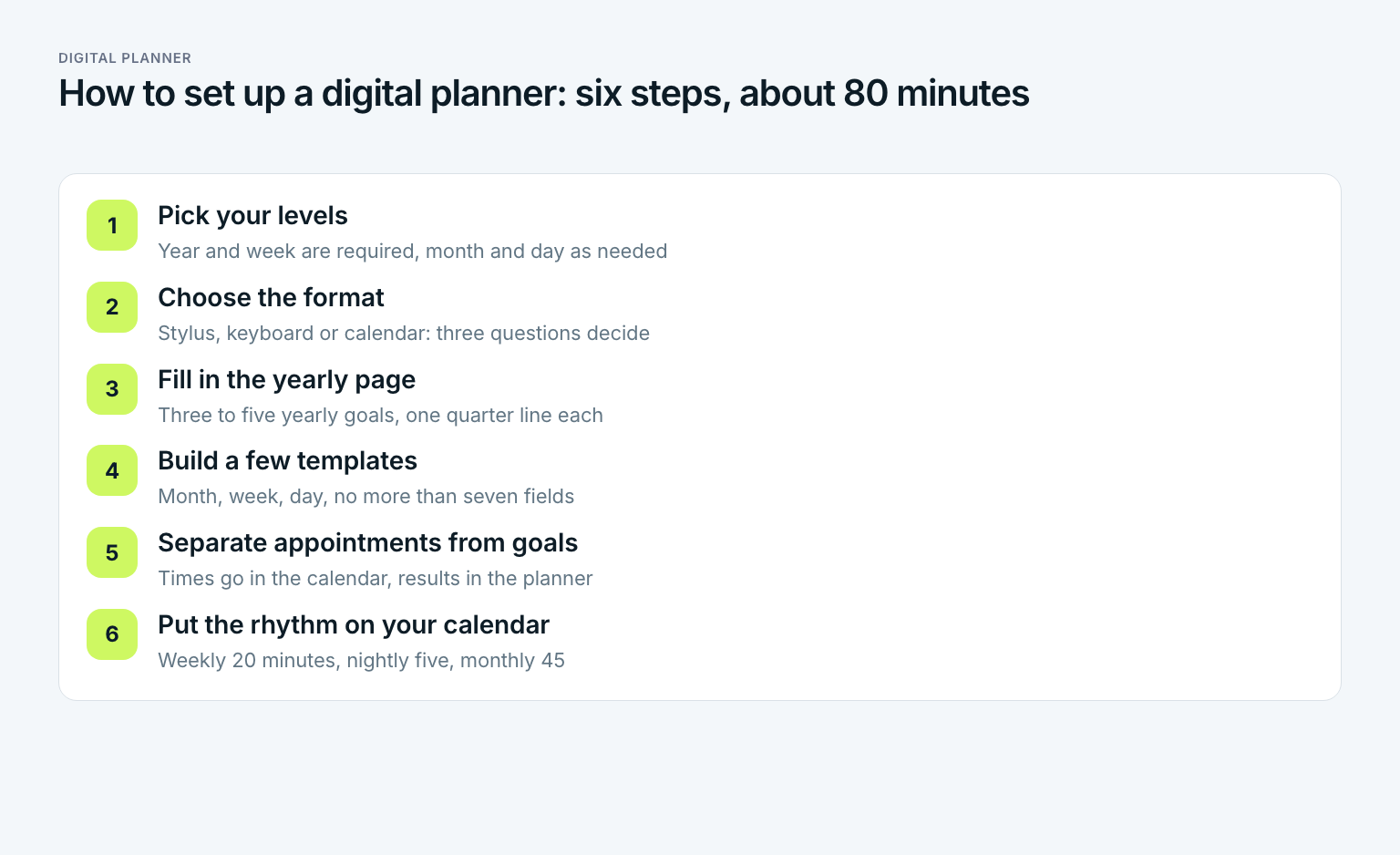
How to set up a digital planner in six steps
Setup takes about 80 minutes and fits into one evening. Order matters: goals and rhythm first, decoration last. Here is how the time splits:
Pick your levels, ten minutes
Decide which of the four levels you will actually keep. Year and week are required. Month and day pay off if you chase several goals at once or have a busy calendar. Write the list down before you download or install anything.
Choose the format, ten minutes
Answer three questions. Do you prefer a stylus or a keyboard? Where do your appointments already live? Does anyone else need to see your plan? A stylus and a light schedule point to a hyperlinked PDF. Typing and reminders point to an app. A full or shared calendar points to the hybrid.
Fill in the yearly page first, 20 minutes
Write three to five yearly goals, each with a number and a date, plus one line for the current quarter. A planner without a yearly page is a pretty calendar.
Build a few templates, 20 minutes
Create exactly three page types: month, week, day. Give each one no more than seven fields. Habit trackers, reading logs, and budget pages are separate projects, not the starter kit.
Separate appointments from goals, 15 minutes
Set one rule: anything with a time and other people goes in the calendar. Anything that describes a result goes in the planner. Then connect the levels, with links in a PDF, with projects or lists in an app, and with focus blocks in the calendar for a hybrid.
Put the rhythm on your calendar, five minutes
Add three recurring events: 20 minutes of weekly planning on Sunday evening or your first day off, five minutes every evening for the next day, and 45 minutes on the last weekend of the month. A planner nobody opens at fixed times becomes an archive within three weeks.
How to make your own digital planner
You do not have to buy a digital planner. You can build your own hyperlinked planner in any presentation app that lets you link slides to each other and export to PDF. Every slide becomes a page. Here is how Priya built hers for the fourth quarter of 2026:
- Pick an orientation. Landscape suits weekly pages with seven columns, portrait suits daily pages. Priya uses landscape throughout, because her tablet lies sideways on the kitchen table when she plans.
- Create the pages. One yearly page, one quarterly page, three monthly pages, 13 weekly pages from the week of October 5 to the week of December 28, one daily template, and ten note pages. That is 29 pages instead of 1,100.
- Build the tabs. The same labels sit on the right edge of every slide: Year, October, November, December, Notes. Each label links to its page.
- Export to PDF and test it. Open the file in your note-taking app and tap every tab once. A link that goes nowhere costs you time every single time you open the planner.
- Make daily pages only when needed. Instead of 92 dated daily pages, Priya duplicates the daily template the night before and writes in the date.
The build took Priya a little over two hours, once. The downloaded file had taken five hours of decorating and lasted nine days. For 2027 she will duplicate the file and rename the months. A planner you build grows with you.
Digital planner app, tablet, or calendar: which one fits you
What is the best digital planner to use? The one you still open three months from now. Your week decides the format, not the length of a feature list:
- Hyperlinked PDF, if you like writing by hand, your schedule is fairly stable, and you mostly plan alone. Typical for students, people studying for an exam, and anyone coming from a paper planner.
- Digital planner app, if you plan on the go, need reminders, and juggle many small recurring tasks. A daily planner app pays off most when your day is made of many short pieces.
- Calendar as planner, if shifts, client meetings, or family logistics run your days. Then the calendar is the source of truth, and the planner adds the goals.
What is the best planner app?
There is no single best planner app, because the jobs are too different. Before you compare apps, check three things. Can it connect a task or a weekly goal to a bigger goal? Does it run on every device you plan on? Can the people you plan with see it? Any app that passes all three is a candidate. Any app that fails the first one is a to-do list with a calendar view.
One question often gets lost: who else looks at your plan? A hyperlinked PDF is a private notebook. Whoever plans with a partner, a family, or a team needs a format that others can see and change. For couples, that is usually a shared calendar plus one shared list of goals.
And the to-do list app? It is built for something else. It collects tasks so your head is free, and it does that well. It does not replace a planner, because it never asks which task moves which goal. Priya does not use one. Her small tasks live as three checkboxes on the daily page. How seven apps compare is laid out in the guide to the best to-do list app.
Priya's first month with a digital planner
Priya chooses the hybrid. Her shifts come from the hospital's scheduling system and land in the calendar on her phone. Appointments go there and only there. Goals, weekly planning, and the daily goal live in her own PDF on the tablet, which already holds her exam review material. She plans her first week on Sunday, October 11, at 7 p.m., her first evening off after a Saturday shift.
| Weekly page field | Priya's entry, week of October 12 |
|---|---|
| October goals | Chapters 1 to 6 plus one practice test, twelve runs, $800 extra on the car loan |
| Shifts | Monday, Wednesday, Saturday, 7 a.m. to 7:30 p.m., straight from the calendar |
| Available hours | About 8.5: 5.5 hours of study blocks plus three runs |
| Weekly goal 1 | Chapters 3 and 4 reviewed, end-of-chapter questions answered |
| Weekly goal 2 | Three runs, including a 9-mile long run on Friday |
| Weekly goal 3 | $200 extra payment sent |
| Focus blocks in the calendar | Tuesday and Thursday 1 to 3 p.m., Friday 2 to 3:30 p.m. |
The new line is the focus blocks. In the paper planner, study time was a wish written on a page. Now it is an event in the calendar, and when a coworker asks to swap a Thursday, Priya can see what the swap would cost before she says yes. That means: the hybrid protects the time the paper planner only described.
On Thursday, October 15, at 9:10 p.m., Priya opens Friday's daily page: the daily goal is the 9-mile run, the appointments come from the calendar, and three small tasks fill the boxes. Five minutes. She reviews the week on Sunday morning in ten minutes. Two of three weekly goals are done. Chapter 4 is only half reviewed, because a mandatory staff training on Thursday afternoon ate one study block. The open half moves to next week's page. In the spiral planner she would have rewritten it. Here she copies it.
After four weeks, Priya takes stock. Weekly planning takes about 20 minutes instead of 50 on paper, and she has not skipped a single week. Nine of twelve weekly goals are done, and the three open ones have names. Is the new planner prettier than the spiral one? No. It is emptier. That is exactly why she uses it.
Your digital planner in the goal chain: from yearly goal to Thursday
A planner with four levels only becomes a system when each level hangs from the one above it. Otherwise it is four page types that happen to share a file. Here is Priya's chain for her most important goal:
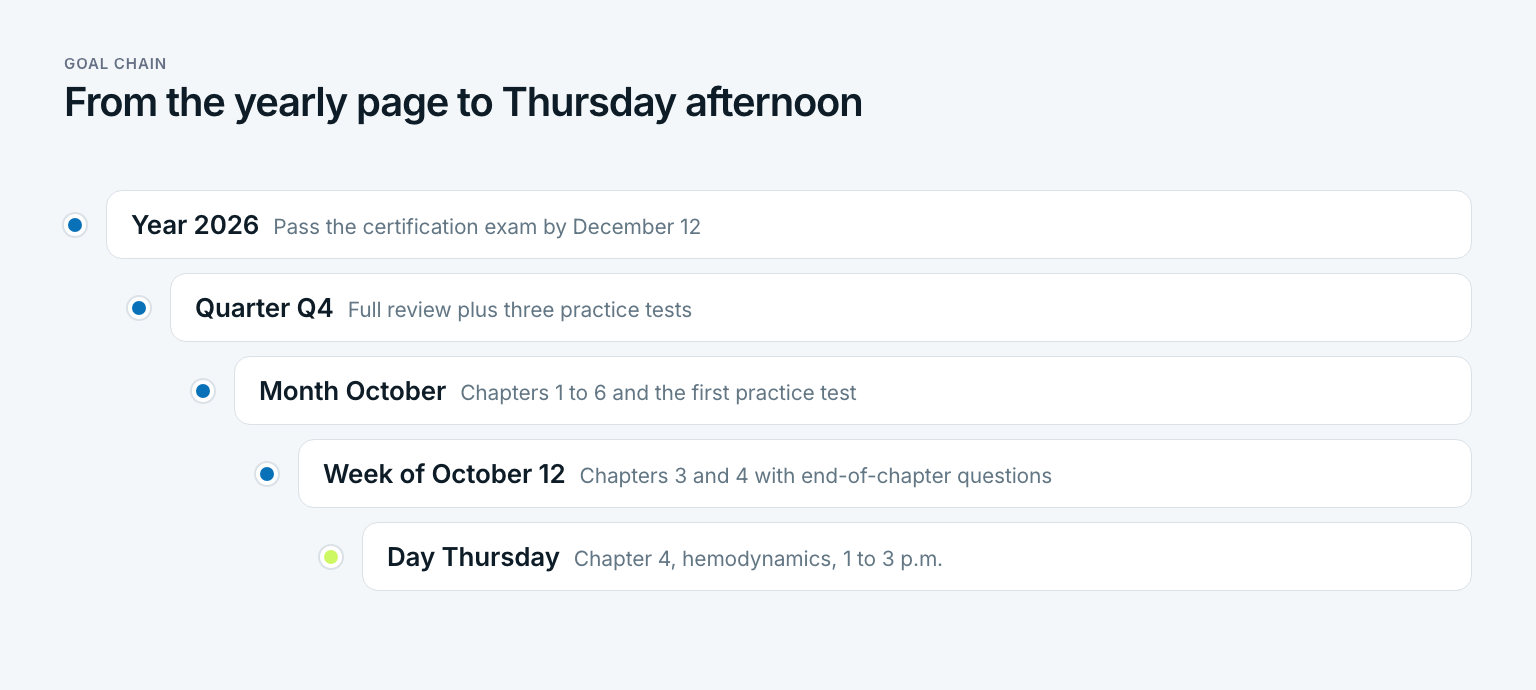
The yearly goal sets the direction: pass the certification exam by December 12. The fourth quarter turns that into a full review plus three practice tests. October takes chapters 1 to 6 and the first practice test. The week of October 12 takes chapters 3 and 4. And Thursday, October 15, has exactly one study task: chapter 4, hemodynamics, from 1 to 3 p.m. The general method behind this translation is in the guide to turning yearly goals into daily steps.
The chain works in both directions. Top down, it produces the plan. Bottom up, it produces progress. A PDF only shows the first direction, because its pages know nothing about each other. In a goal app like Gaapp, every goal hangs from its parent, so on Sunday you can see how much one finished week moved the quarter. For the rhythm in between, monthly planning takes 45 minutes at the end of each month, and annual planning handles the level at the top.
The three mistakes nobody notices
Most digital planners are never deleted. They stay on the device and quietly stop being opened. Three mistakes lead there, and all three feel like diligence at the start.
The most common mistake: decorating instead of planning
Anyone who spends more time on covers, stickers, and color palettes than on planning in the first week is training the wrong habit. Decorating is fine, but only after four weeks of use. By then you know which pages you actually open, and you decorate only those.
- Appointments in both planner and calendar. Keeping appointments in two places sounds thorough. Within two weeks one of them is wrong, and you trust neither. An appointment belongs in exactly one place, and that place is the calendar.
- Dated daily pages for the entire year. 365 ready-made days look complete. But every blank day is a small accusation, and after three blank days in a row the planner feels like a game you already lost. Daily pages work better when you make them the night before.
- A planner without yearly goals. Weekly and daily pages are easy to fill without any direction. By December the planner is full and the year is still empty. Without a yearly page, a planner measures effort, not progress.
All three mistakes share a root. The planner is treated as an object, not a habit. That means: the most important page in your digital planner is the recurring calendar event that tells you when to open it.
Three questions before you fill a single page
Before you create your first weekly page, answer three questions. They take five minutes and spare you the setup high:
- Which three to five results should exist by the end of the year, and are they on the yearly page yet?
- Where do my appointments live today, and what rule keeps them apart from my goals?
- When exactly will I open the planner, weekly, nightly, and monthly, and is that on my calendar?
Priya answered all three only on her second try. The first planner was prettier. The second one gets used. A digital planner is not a product you pick. It is a rhythm you move onto a device.
Frequently asked questions about digital planners
What is the best digital planner to use?
The best digital planner is the one you still open three months from now. If you love handwriting, a hyperlinked PDF on a tablet works well. If you need reminders, a planner app fits better, and if shifts or meetings run your week, a hybrid of your calendar and a planner is usually the calmest choice.
How much does a digital planner cost?
It depends more on the format than on the brand. Hyperlinked PDF planners are usually a one-time purchase from independent designers, and many planner apps offer a free version with paid upgrades. Building your own in a presentation app costs only an evening, although the handwritten format assumes you already own a tablet and stylus.
What is the best free digital planner app?
Often the best free option is already on your phone: the built-in calendar for appointments plus a free notes app or a self-made PDF for goals. Before you install anything new, check whether it can link a weekly goal to a bigger goal. A free app that only collects tasks is a to-do list, not a planner.
How can I create my own digital planner?
Open a presentation app and make one slide per page: a yearly page, monthly pages, weekly pages, and one daily template. Link tabs on the edge of each slide to the matching pages, export the file as a PDF, and open it in a note-taking app with a stylus. Tap every link once before you start planning.
Is a digital planner better than paper?
It is better for replanning, and paper is better for focus. A digital planner saves the time you would spend copying and rewriting, especially if your schedule changes every week. Paper wins if your plans rarely move and a device would distract you.
Do I need an iPad for a digital planner?
Only for the handwritten PDF format, and even then any tablet with a stylus and a note-taking app that handles linked PDFs will work. Planner apps and calendar hybrids run on phones and computers. If you already own a tablet and stylus, try the handwritten version before you buy anything.
Last updated: 14 October 2026
Read next
 Planning
Cleaning Schedule: Daily, Weekly and Monthly Tasks
A cleaning schedule is not a Saturday to-do list: daily, weekly and monthly tasks, a printable template and a fair split for families.
15 min read
 Planning
Study Plan: How to Make One You Can Actually Follow
A study plan is not a schedule. Make one in six steps: inventory, hours math, buffer, a sample study schedule and a template, with a worked example.
17 min read
 Planning
Bullet Journal: How to Start One You'll Actually Keep
A bullet journal is not an art project. Learn the bullets, four core modules, migration and a six-step setup, with an example, 12 ideas and a goal chain.
15 min read